


I’ve spent years looking for the perfect writing application, and if there’s one thing I’ve learned, it’s that writers can be incredibly demanding when it comes to the software they use. We want something simple enough to let us concentrate on our stories, powerful enough to organize an entire fictional universe, and flexible enough to adapt to the way our brains work. We also want our characters, locations, research, outlines, notes, and manuscripts available without having to jump between five different applications every time we forget an important detail.
- Is Scrivener still worth using in 2026?
- 1. Ulysses — Best for writers who love the Apple ecosystem
- 2. Dabble — Best for writers who want something simpler than Scrivener
- 3. Atticus — Best for authors who want to format their books
- 4. Reedsy Studio — Best free Scrivener alternative for self-publishing
- 5. Obsidian — Best for writers who want complete control over their notes
- 6. Novelcrafter — Best for complex fiction and AI-assisted workflows
- 7. LivingWriter — Best for writers who want structure and cloud convenience
- 8. Manuskript — Best free, open-Source alternative
- 9. The Novelist — The writing and worldbuilding app I’m building for fiction authors
- A dedicated place for writing and worldbuilding
- A writing environment that doesn’t compete with the manuscript
- Local desktop software matters to me
- Where The Novelist still falls short
- The Best Scrivener Alternatives Compared
- What I’d recommend for different types of writers
- Your writing software shouldn’t hold your manuscript hostage
- One more thing: Stop searching for the perfect writing app
- Final thoughts: Which Scrivener alternative would I choose in 2026?
That sounds reasonable, doesn’t it? Well, apparently, building the perfect writing environment is a lot more complicated than it seems. I have several fiction projects, including science-fiction stories that require a ridiculous amount of planning and worldbuilding. Some characters have complicated backstories, fictional locations have their own histories, and certain events affect other events that might not happen until several chapters later. I love that part of writing, but I don’t particularly enjoy spending half an hour looking for information that I know I’ve already written down somewhere.
This is why applications like Scrivener became so popular among novelists. Instead of treating your entire book as one enormous document, Scrivener gives you a dedicated environment where you can break your manuscript into smaller pieces, organize research, move scenes around, and keep everything together. And, to give credit where it’s due, Scrivener has been doing many of these things exceptionally well for a very long time.
But writing software has changed. We now have dedicated applications for worldbuilding, browser-based editors that automatically format books for publishing, minimalist writing environments, flexible knowledge-management tools, and applications that introduce artificial intelligence into the creative process. Some are easier to learn than Scrivener. Others offer features Scrivener doesn’t have. A few are free, while others expect you to pay a monthly subscription that can become rather expensive over several years.
I’ve approached this comparison as both a fiction writer and someone who has spent years working with software. I’m interested in how these applications support the entire writing process, not just how attractive their editors look in promotional screenshots.
One disclosure before we begin: I’m also the creator of The Novelist, a desktop application I’m developing specifically for fiction writers. I’ll include it in this comparison because it belongs in the conversation, but I’ll be equally clear about its limitations. The established applications have advantages that my own software doesn’t necessarily offer, and I think readers deserve to know that.
This isn’t a laboratory benchmark or a claim that I’ve exhaustively tested every feature and operating-system combination. It’s a practical comparison informed by my writing workflow, my experience with writing software, and the products’ current capabilities.
With that out of the way, let’s find out which Scrivener alternatives are worth your attention in 2026.
Is Scrivener still worth using in 2026?
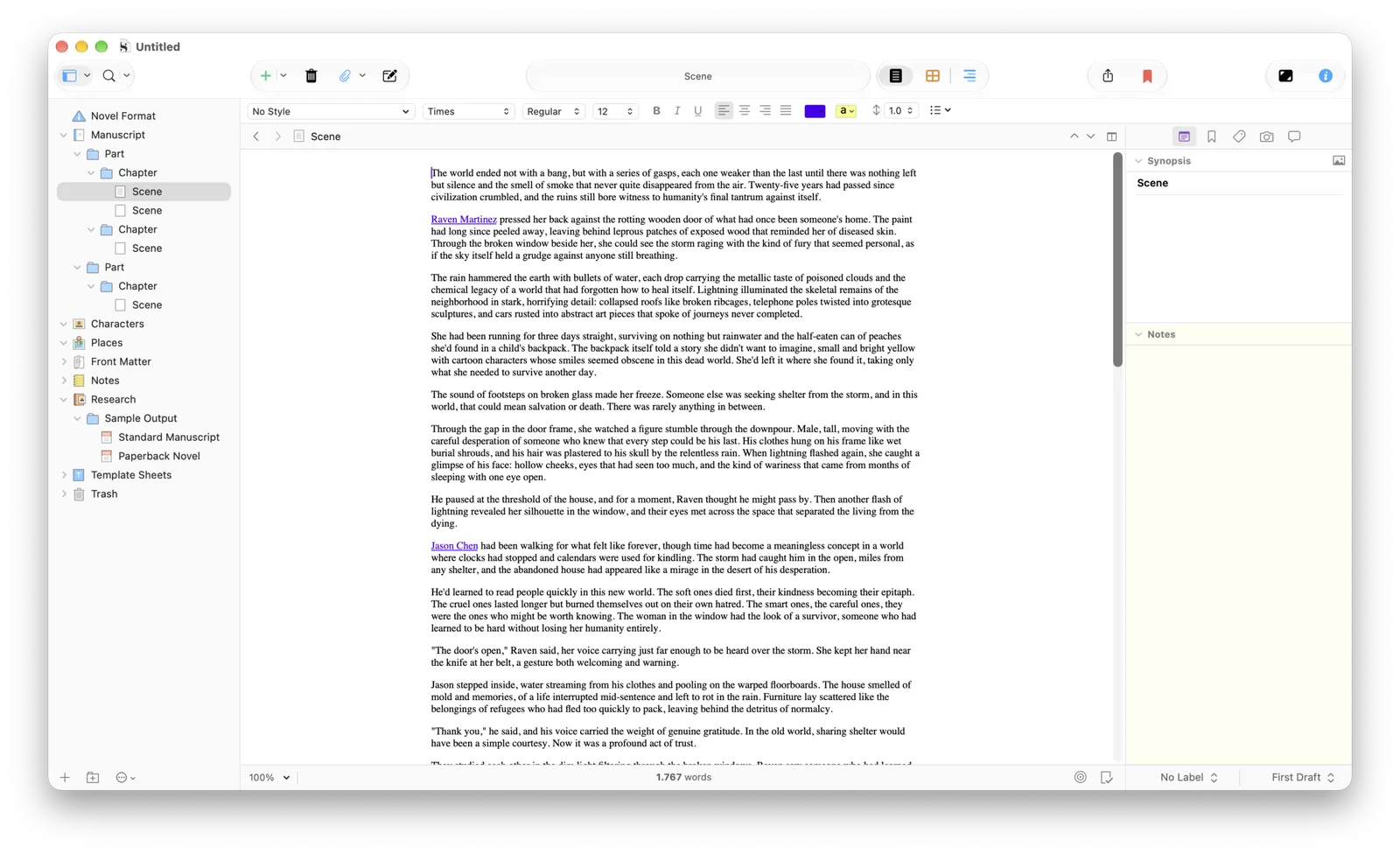
Before looking for an alternative, I think it’s important to understand why Scrivener remains such a popular choice. After all, there’s little point in replacing an application simply because another one has a more modern interface or a prettier website. Scrivener isn’t just a text editor, but rather an entire project-management environment built around long-form writing, and its greatest strength is how much control it gives you over the structure of a manuscript.
The Binder lets you organize chapters, scenes, folders, research documents, character notes, and practically anything else you want to keep alongside your book. The Corkboard provides a visual representation of your documents, while the Outliner gives you another way to inspect and reorganize your manuscript. There’s also a surprisingly powerful Compile system, which lets you transform your project into different document and publishing formats.
If you’re writing an enormous fantasy novel containing multiple perspectives, timelines, and complicated plotlines, Scrivener can handle a level of organizational complexity that would make a traditional word processor extremely uncomfortable to use.
And then there’s the price. Unlike many modern writing applications, Scrivener doesn’t require an ongoing subscription. A standard macOS or Windows license currently costs approximately sixty US dollars, with separate licensing arrangements for iOS and multiple desktop platforms. On the one hand, I appriciate that, because it reassures me about purchasing software without having another recurring payment added. On the other hand, you only get one version. For example, if you get Scrivener’s version 3 and the team releases version 4 a few months later, you won’t get it without paying first.
So, why would anyone want to replace it?
For starters, Scrivener can be intimidating. The interface contains enough features, panels, menus, options, and configuration settings to make a beginner feel as though they’ve accidentally opened professional publishing software instead of a place to write their first chapter. That’s not necessarily a design failure, because much of that complexity exists for good reasons, but it does mean that learning the application can become a project in itself.
Collaboration is another limitation. Scrivener wasn’t designed around multiple people editing the same manuscript in real time, and moving between computers requires more care than it does with cloud-first applications. Its Compile system is powerful, but that power also introduces a learning curve for authors who simply want a nicely formatted book.
Most importantly, Scrivener isn’t necessarily the perfect solution for every kind of writer. Someone writing a straightforward contemporary romance might not need its extensive organizational capabilities, while a fantasy novelist building an interconnected universe might prefer a more specialized system for managing characters, locations, relationships, and lore.
My opinion? Scrivener is still worth buying in 2026. But whether it’s worth buying for you is an entirely different question.
Scrivener Review
$69.99 (one-time)1. Ulysses — Best for writers who love the Apple ecosystem
Platforms: macOS, iPadOS, iOS.
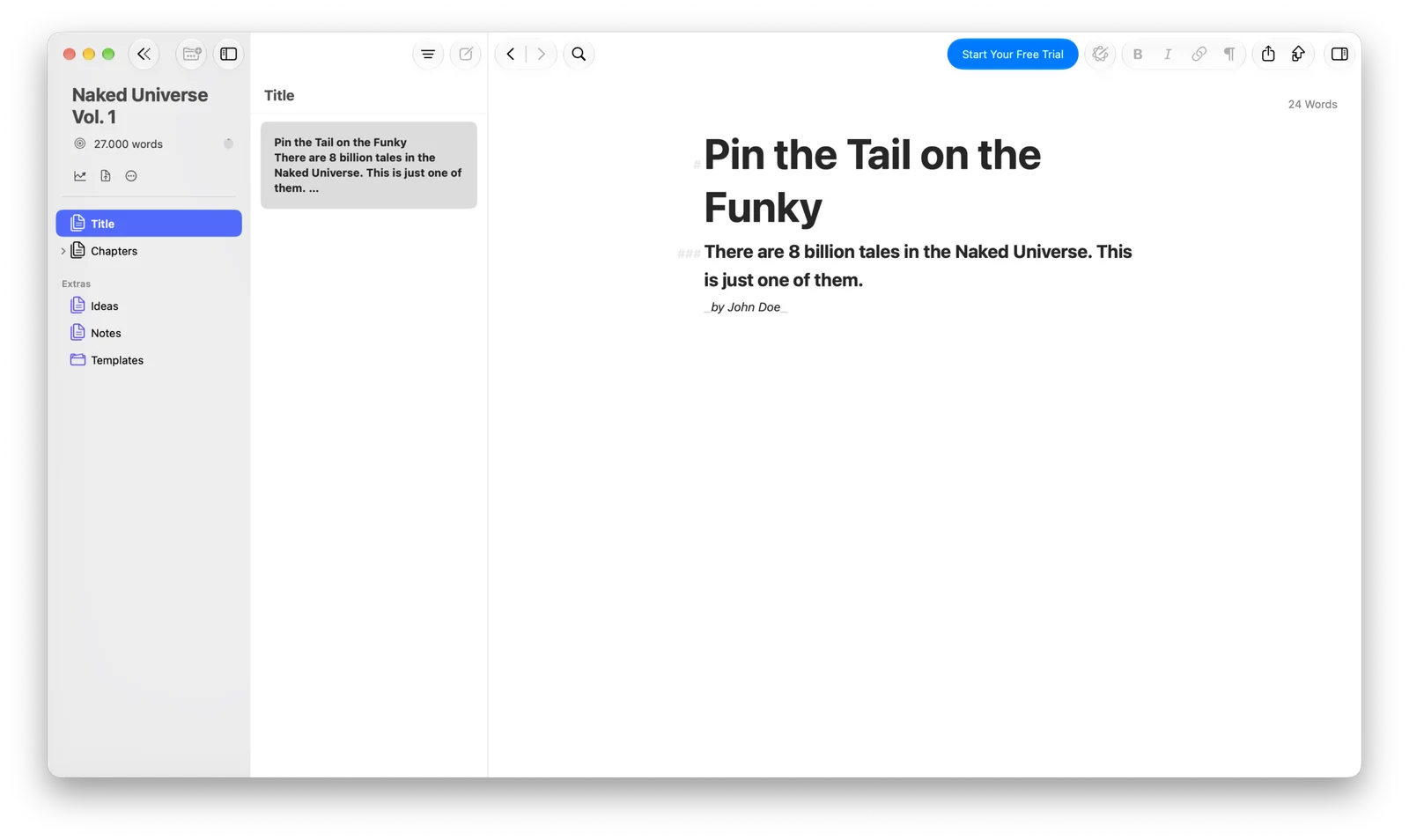
If I had to describe Ulysses in one sentence, I’d call it the writing application for people who want their software to disappear while they’re working. Where Scrivener offers a substantial collection of tools and configuration options, Ulysses takes a considerably more restrained approach. Its interface feels clean, focused, and carefully considered, which is something I personally appreciate in applications I use for long periods.
Instead of the traditional document structure found in Microsoft Word, Ulysses organizes content into sheets and groups. You can create separate sheets for individual scenes or chapters, arrange them into folders, and gradually build a manuscript without having to scroll through tens of thousands of words in a single document. It also uses a Markdown-oriented writing approach, which may be either a wonderful feature or an unnecessary annoyance depending on your preferences.
If you’re comfortable with lightweight markup, it can make formatting feel almost effortless. If you prefer clicking familiar buttons to make text bold or italic, you might need a little time to adjust.
One of Ulysses’ biggest advantages is its integration with Apple’s ecosystem. If you own a Mac, iPad, and iPhone, having your writing synchronized through iCloud can make switching devices incredibly convenient. You could work on a chapter at your desk, make a few corrections on your iPad, and capture an idea on your phone without reorganizing your files manually.
However, Ulysses isn’t designed to replace an elaborate worldbuilding database, and I wouldn’t consider it a complete solution for managing the relationships between dozens of characters, locations, factions, and fictional events. The other obvious limitation is that Windows and Linux users are excluded. And although its subscription isn’t outrageous, I understand why some writers would rather pay once for software that lives on their computer.
Who should choose Ulysses? Writers who use Apple devices, appreciate elegant interfaces, and want a clean environment for drafting and organizing their manuscripts without having to configure countless additional features. I wouldn’t choose it primarily for complicated worldbuilding. For straightforward long-form writing, however, it’s easy to understand its appeal.
Ulysses Review
$39.99 (per year)2. Dabble — Best for writers who want something simpler than Scrivener
Platforms: Web, Windows, macOS, and other supported devices.
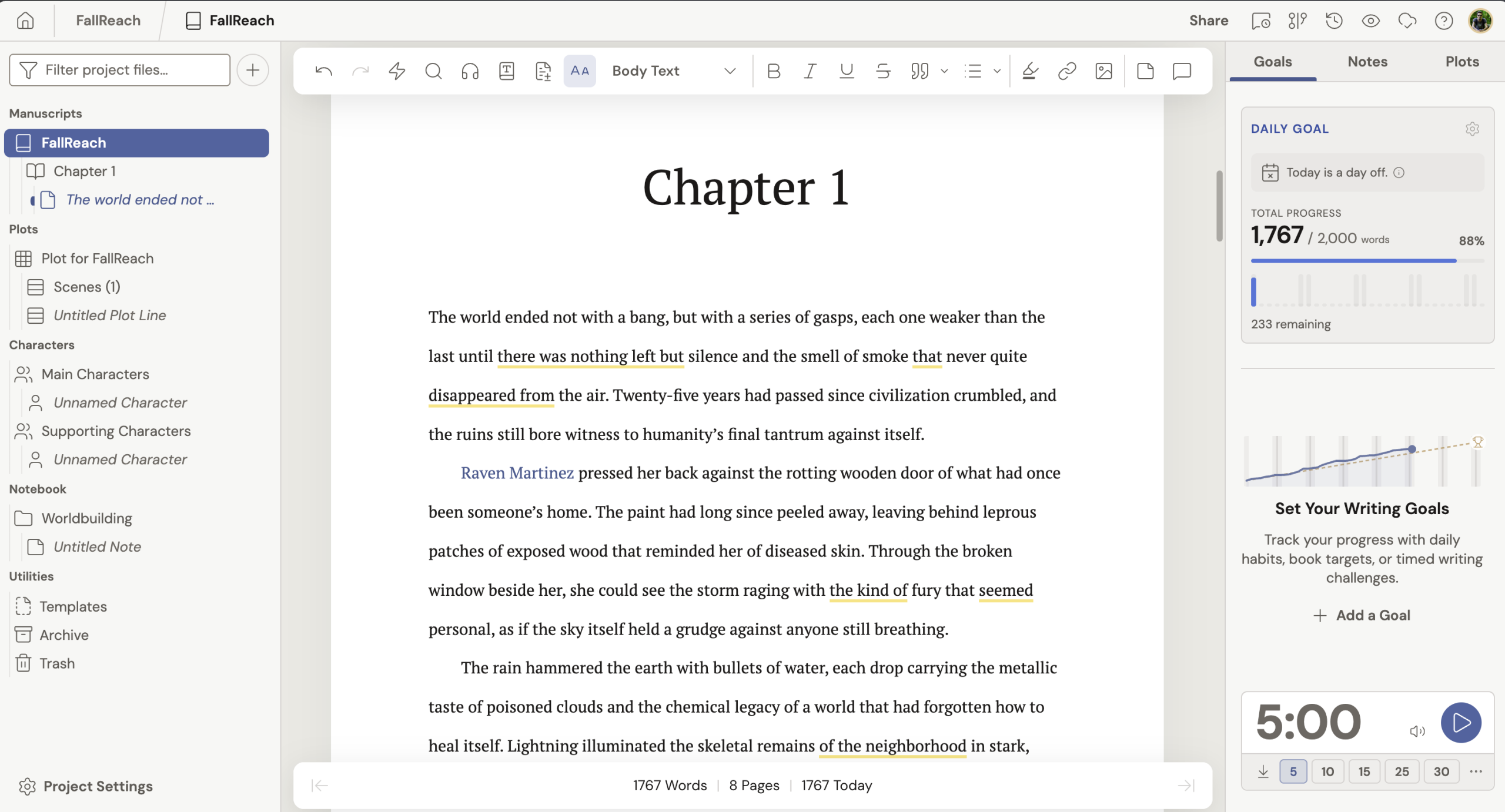
One of my biggest complaints about modern software is that developers sometimes confuse offering more features with offering a better experience. A writing application can support fifty different operations, but if I need ten clicks to perform something as basic as creating a chapter, I don’t consider that particularly useful. Dabble seems to understand this problem.
It’s designed specifically for authors who want a comfortable environment for writing novels without having to learn the extensive functionality of Scrivener. The overall approach is more approachable, with an emphasis on drafting, manuscript organization, plotting, and keeping authors focused on their stories. Its Plot Grid is particularly interesting because it allows writers to visualize how their story develops across different plotlines. Rather than maintaining a separate spreadsheet for every subplot, you can organize story beats and see how they relate to the chapters you’re writing.
For writers working with multiple perspectives, a plotting tool like this can be genuinely useful. Imagine writing a thriller in which three characters investigate the same mystery from different locations. Keeping track of what each character knows, when they discover important information, and how their storylines eventually intersect can become a serious organizational challenge. Dabble’s plotting approach helps address that problem without asking you to build the entire system yourself.
Another significant advantage is its cloud-oriented workflow. Your writing can follow you between supported devices, while its desktop experience offers offline-writing capabilities. That’s convenient for anyone who works on different computers or doesn’t want to manually move project folders around. Where things become less attractive is the subscription model. I’m not fundamentally against paying subscriptions when software provides ongoing value, but I do think authors should consider how much a writing application will cost over several years, particularly when they’re working on projects that might take a very long time to finish.
Dabble also isn’t a complete book-production environment. Authors who need polished EPUB files or professionally formatted print editions may still need another application when their manuscript is ready for publishing.
Who should choose Dabble? Novelists who find Scrivener overwhelming, appreciate visual plotting, and value convenient syncing across devices. For a writer who wants to spend less time configuring software and more time actually producing chapters, Dabble is certainly worth investigating.

Dabble Review
$19 (per month)3. Atticus — Best for authors who want to format their books
Platforms: Browser-based and supported desktop-style installations.

There’s something interesting about the differences between writing a novel and publishing one. For most of the drafting process, authors need tools that help them organize their ideas, develop characters, maintain continuity, and produce thousands of words. Once the manuscript is finished, however, their priorities change dramatically. Suddenly, they need correctly formatted chapters, professional typography, consistent spacing, appropriate front and back matter, and files that can be uploaded to publishing platforms.
This is where Atticus becomes particularly attractive.
Atticus places considerable emphasis on combining writing with book formatting, making it an interesting alternative for independent authors who don’t want to purchase separate applications for every stage of their publishing workflow.
You can work on your manuscript, organize its chapters, and then use formatting tools to prepare the finished book for publication. Its templates and visual options are designed to simplify a process that can otherwise involve a frustrating amount of trial and error. That’s particularly useful if you’ve ever spent an entire evening trying to understand why a chapter heading looks perfect in one export and completely wrong in another.
I also appreciate its one-time payment model. While the initial purchase costs considerably more than Scrivener, it can become more economical than subscriptions if you use it consistently over several years. However, I wouldn’t describe Atticus as the ideal choice for someone whose primary concern is sophisticated fictional-world management. Its strongest selling point is the combination of manuscript writing and publishing-oriented formatting, rather than deeply interconnected story information.
And this distinction matters. A powerful formatting application won’t necessarily help you remember that a particular character lost their left arm in chapter twelve, or that two fictional cities are supposed to be separated by an impassable mountain range.
Who should choose Atticus? Independent authors who want to write their manuscripts and prepare professional-looking ebooks or print editions without relying on multiple expensive formatting tools. If self-publishing is your immediate priority, Atticus deserves a serious look.

Atticus Review
$147 (one-time)4. Reedsy Studio — Best free Scrivener alternative for self-publishing
Platforms: Web browsers.
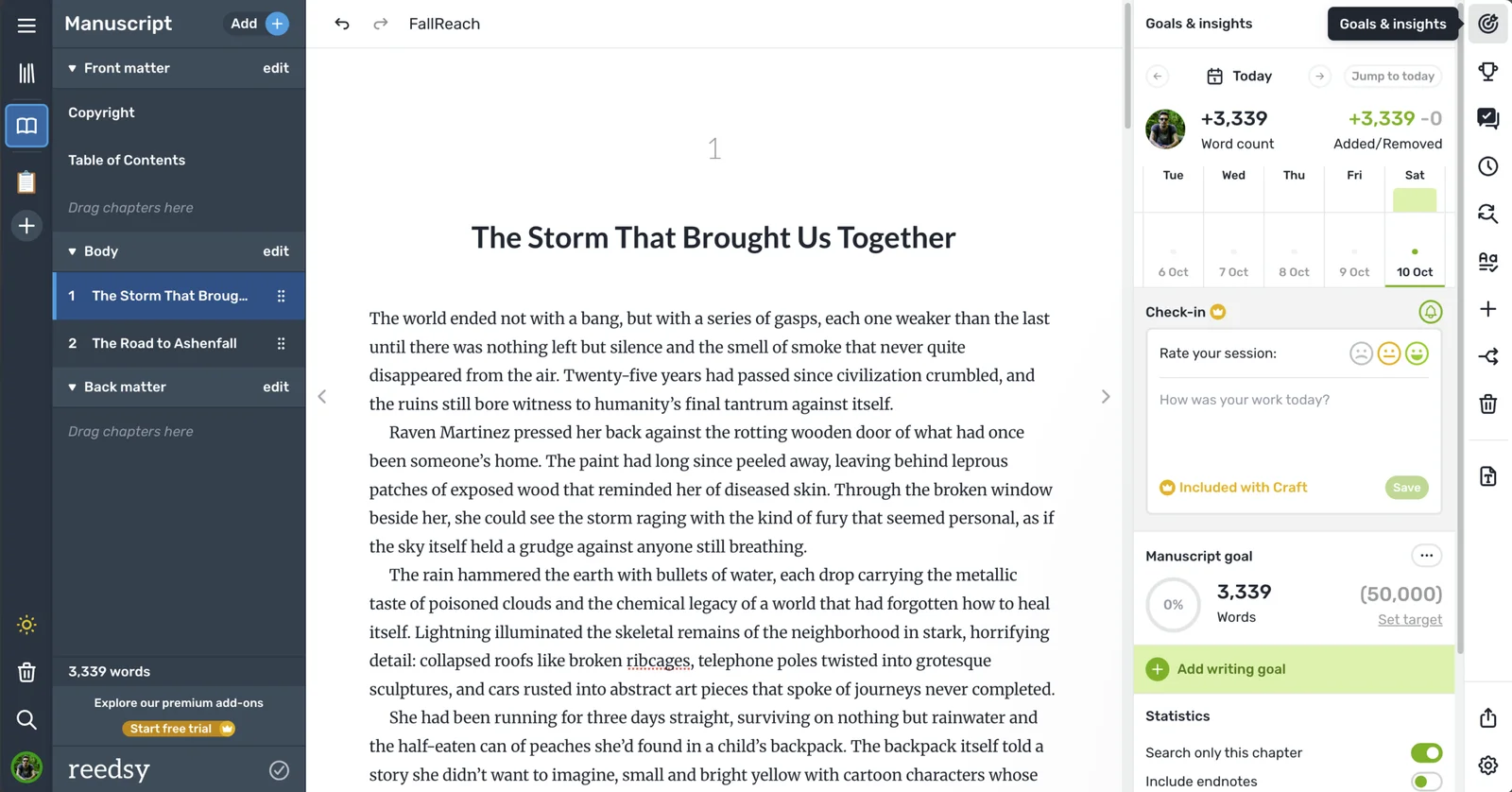
I have a lot of respect for applications that provide genuinely useful functionality without immediately asking users to enter their credit card details. Reedsy Studio is one of the most interesting examples in the writing-software market because it offers a surprisingly comprehensive environment for authors who want to write, organize, collaborate, and eventually publish their books.
Unlike Scrivener, Reedsy Studio runs in your browser. You don’t need to install a traditional desktop application, and you can access your projects from compatible devices as long as you have an internet connection. Its manuscript editor is straightforward, with tools for organizing sections, chapters, and scenes. You can import existing drafts, continue writing, and keep your manuscript structured without having to learn an intimidating collection of advanced settings.
Reedsy also offers planning Boards for organizing information such as characters, locations, research, and outlines. Some more advanced planning capabilities require paid add-ons, but the free offering is still impressive. Where I think Reedsy really distinguishes itself is in the publishing process. You can export your work into EPUB and print-ready PDF formats without buying expensive software, which makes it particularly valuable for authors working with limited budgets. There’s also real-time collaboration, tracked changes, and commenting, making it more convenient when working with an editor or co-author.
For someone publishing their first book independently, that’s a compelling combination. But there is one limitation that would personally prevent me from using Reedsy Studio as my only writing environment: it doesn’t currently support offline writing.
I prefer having a writing application installed on my computer, with my manuscript and research available whether or not my internet connection is working. That doesn’t mean cloud applications are inherently unreliable, but I dislike having internet access become a requirement for something as personal and fundamental as writing a chapter. I also think authors dealing with highly complicated fictional universes may eventually want more specialized worldbuilding and relationship-management capabilities than a general-purpose planning board can comfortably provide.
Who should choose Reedsy Studio? Writers who want a free, accessible environment for drafting, collaborating, and formatting books for publication. If your budget is practically nonexistent and you’re comfortable working online, Reedsy Studio might be one of the strongest options available.
Reedsy Review
Free ($4.99 for PRO per month)5. Obsidian — Best for writers who want complete control over their notes
Platforms: Windows, macOS, Linux, iOS, Android.
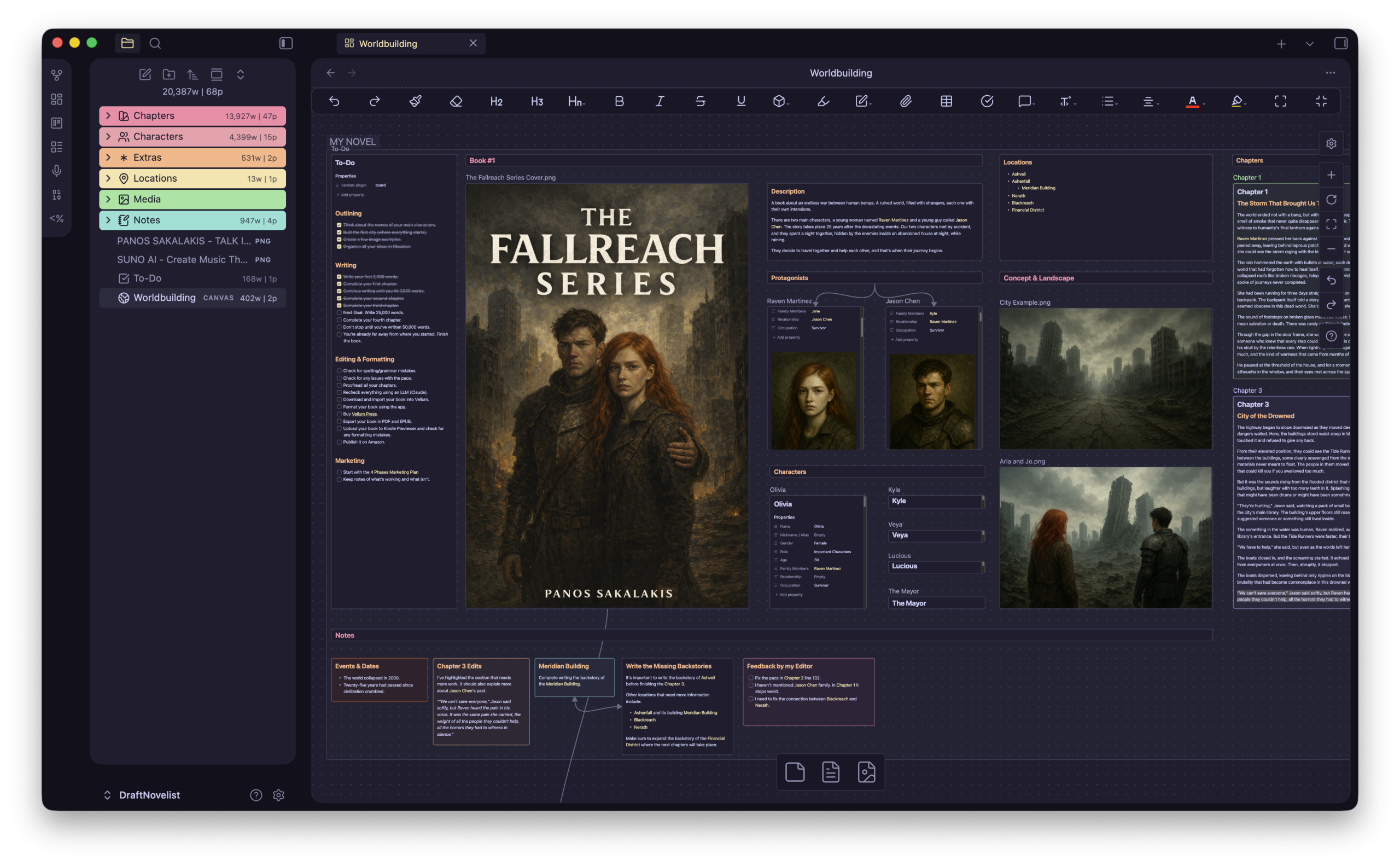
Now we’re getting into something a little different. Obsidian isn’t exclusively a novel-writing application, and that’s simultaneously its greatest advantage and one of its biggest weaknesses. At its core, Obsidian is a knowledge-management application built around Markdown files. You can create notes, organize them into folders, connect them using internal links, and build an interconnected collection of information that can become as simple or complicated as you want.
For fiction writers, that flexibility opens up some interesting possibilities. Imagine you’re working on a science-fiction series that takes place decades after the collapse of modern civilization. You have characters who belong to different factions, abandoned cities with complicated histories, important events that shaped the world, and pieces of technology that survived the disaster. Instead of keeping every piece of information isolated, you can create separate notes and connect them through links. A character’s profile might reference their hometown, the faction they belong to, and the historical event responsible for their current circumstances.
Obsidian’s Graph View can then visualize those relationships, giving you a different perspective on how your fictional universe is connected. That’s an incredibly attractive concept for writers who enjoy worldbuilding. And because Obsidian supports community plugins, it’s possible to expand its functionality with additional tools for organizing longer manuscripts, tracking writing goals, and building specialized workflows.
However, there’s an important catch: you may spend more time building your writing system than using it. I know this problem particularly well because I have a technical background. Give me a flexible application with plugins, customization options, and a large collection of community extensions, and there’s a good chance I’ll spend several hours configuring everything before doing the actual work. That’s enjoyable when the goal is experimenting with software. It’s less enjoyable when you’re supposed to be finishing a novel.
Obsidian also doesn’t provide a complete book-publishing workflow out of the box. You’ll probably need additional tools for manuscript preparation and formatting. Nevertheless, the fact that it stores notes as local Markdown files is a major advantage. Authors who care about portability, ownership, and avoiding dependence on proprietary document formats will appreciate that approach.
Who should choose Obsidian? Writers who enjoy customizing their tools, want a powerful interconnected knowledge base, and don’t mind putting effort into designing their own workflow. For worldbuilding enthusiasts, it’s particularly compelling. For authors who simply want to install something and immediately begin writing their first chapter, I would recommend something more specialized.

Obsidian Review
Free ($4 for sync per month)6. Novelcrafter — Best for complex fiction and AI-assisted workflows
Platforms: Web-based, with desktop-oriented workflow support.
Artificial intelligence has become one of the most controversial subjects in creative writing, and I can understand both sides of the discussion. Some writers consider AI-assisted writing a useful way to brainstorm ideas, examine story structures, and overcome creative obstacles. Others don’t want anything to do with generated prose and would prefer their writing applications to remain completely separate from those technologies.
Personally, I think there’s a significant difference between using technology to help organize a complicated project and allowing it to produce the creative work for you. But that’s another discussion entirely.
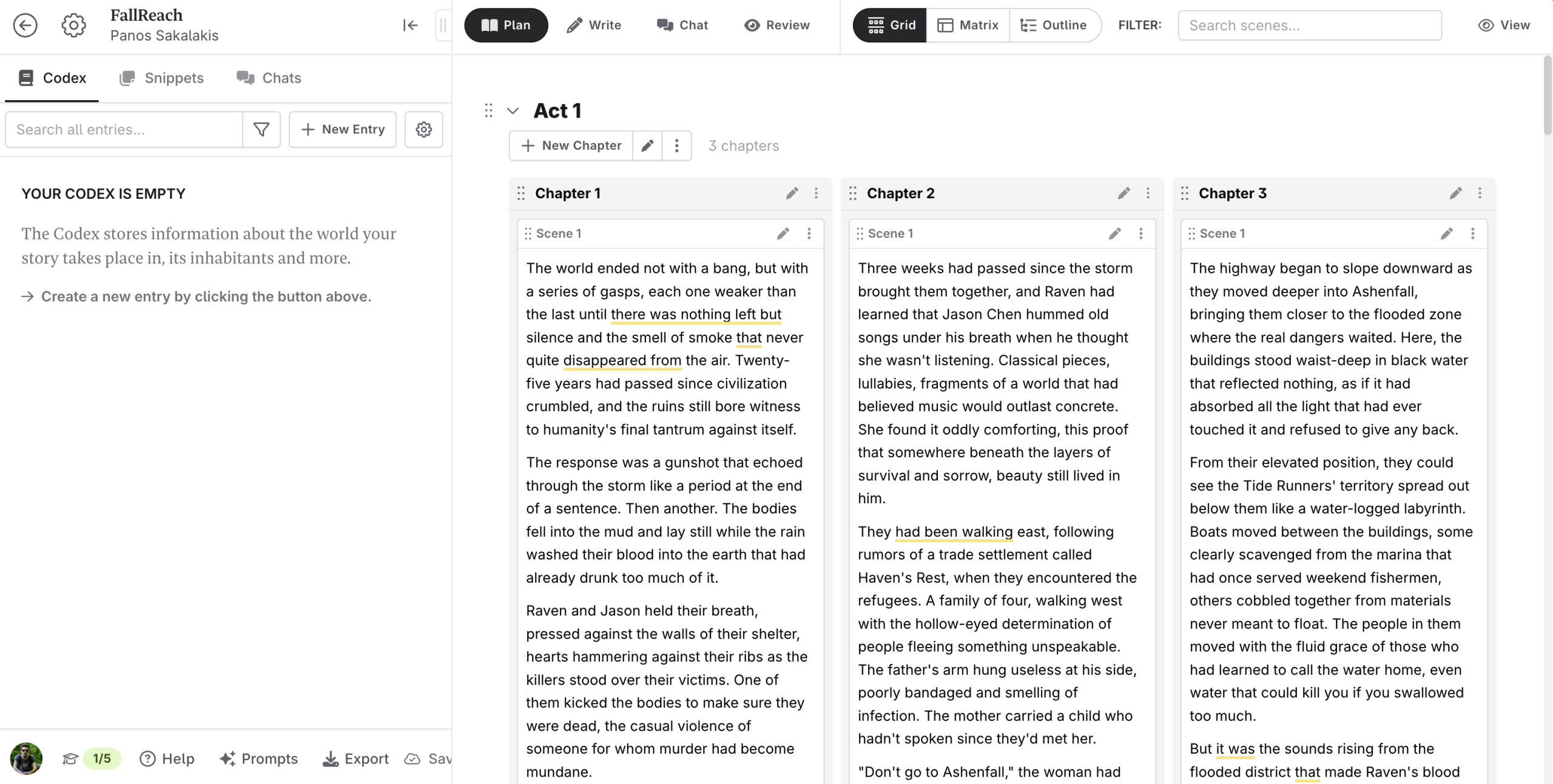
Novelcrafter is worth mentioning because it approaches fiction writing with a strong emphasis on structured story information and optional AI integration. Its Codex provides a centralized place for information about characters, locations, lore, and other elements of your fictional universe. This becomes especially useful when you’re working on longer stories or multiple books that share the same setting.
Think about a fantasy series containing several kingdoms, dozens of recurring characters, unique magical systems, and historical events that affect the entire story. A dedicated reference system can help authors maintain consistency without constantly searching through old chapters.
Novelcrafter also offers AI-assisted features on eligible plans, with the ability to connect supported AI providers using your own API credentials. That gives interested writers more flexibility over their AI workflow, although external provider usage may introduce additional costs.
I appreciate the emphasis on maintaining story context, because that’s a problem that ordinary text editors don’t really solve. Even if you’re writing every word yourself, having your fictional universe properly organized can save enormous amounts of time. However, if you have no interest in AI and prefer traditional desktop software, some of Novelcrafter’s more advanced capabilities may not be particularly relevant to your needs.
Its subscription model also deserves consideration, especially if you intend to use it for several years or connect paid AI services.
Who should choose Novelcrafter? Authors writing complex stories or series who want structured story information and are interested in integrating AI tools into their creative workflow. If AI is something you actively want to avoid, you may find another application more suitable.

Novelcrafter Review
Starts at $4 per month7. LivingWriter — Best for writers who want structure and cloud convenience
Platforms: Web and supported mobile and desktop workflows.

LivingWriter is another application designed around the idea that writing software should offer more structure than Google Docs without becoming as complicated as Scrivener. Its interface focuses on manuscripts, chapters, notes, research, and other organizational features that authors typically need throughout the writing process.
What makes it appealing is the combination of an approachable writing environment and tools intended to help writers manage their projects over time. It supports writing goals, manuscript organization, and collaboration, while its cloud-based system handles synchronization and provides revision-history functionality.
LivingWriter also incorporates AI-related features, although the extent of those capabilities depends on the plan you’re using. I personally like the idea of having a writing environment that feels reasonably familiar while still offering features designed specifically for longer projects. Many novelists don’t necessarily need a complicated knowledge graph or an extensive collection of customization options; they simply want their chapters organized, their research accessible, and their progress visible. LivingWriter attempts to address that middle ground.
However, its subscription pricing may become difficult to justify if you’re working with a limited budget. Fifteen dollars per month might not sound particularly expensive at first, but that’s one hundred and eighty dollars over a year, assuming you remain subscribed for all twelve months. Over three years, you’re looking at a much more substantial investment. That doesn’t automatically make it poor value, especially if cloud synchronization and collaboration are important to you. But it’s something I would consider carefully before moving an entire manuscript into a subscription-based service.
Who should choose LivingWriter? Authors who want a relatively approachable alternative to Scrivener, value cloud convenience, and are comfortable paying for an ongoing service.
LivingWriter Review
Starts at $15 per month8. Manuskript — Best free, open-Source alternative
Platforms: Windows, macOS, Linux.
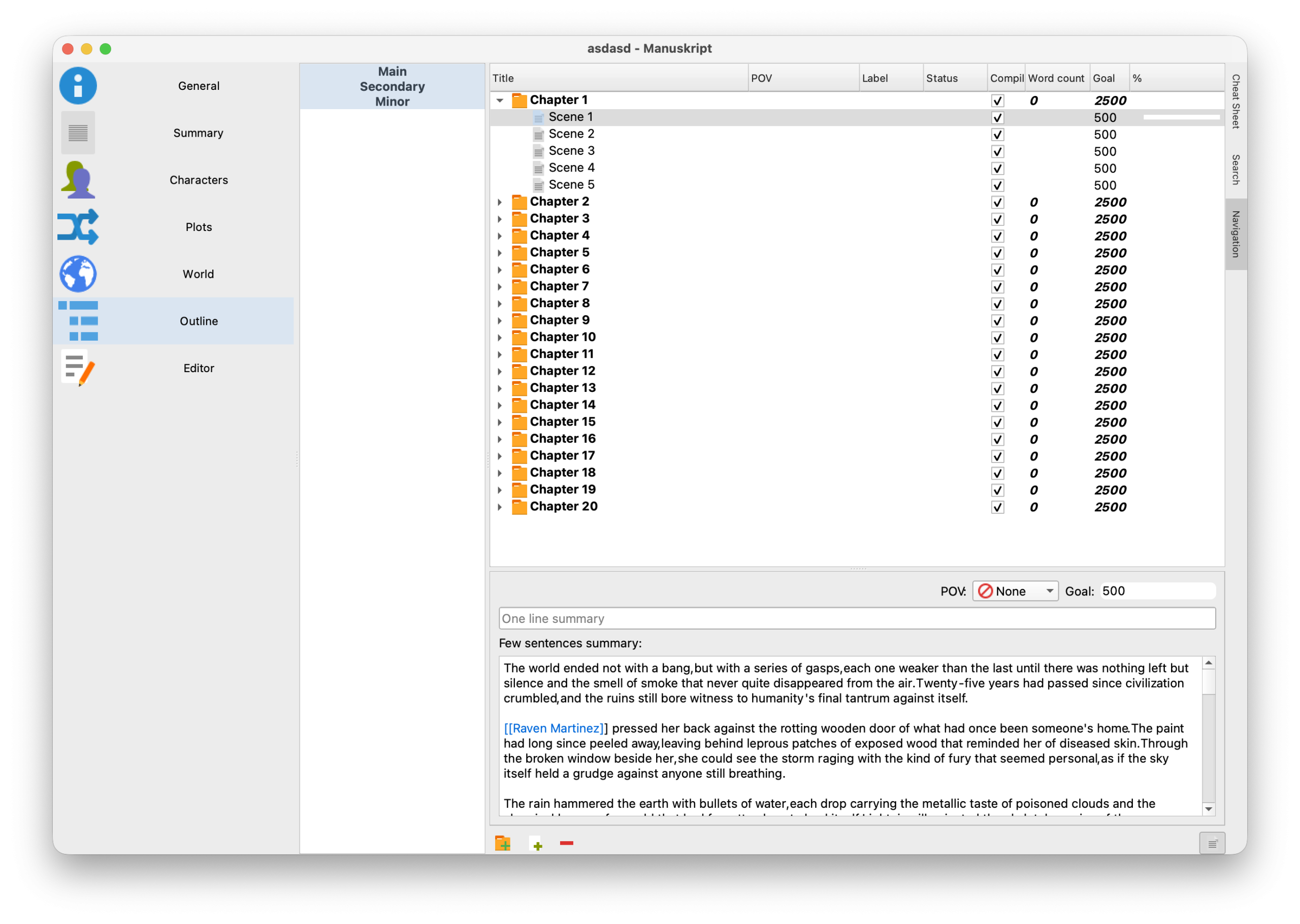
Not every writer wants to spend money on software, and not every useful writing tool needs a polished commercial website or a substantial marketing budget. Manuskript is an interesting alternative precisely because it takes a different approach.
It’s a free, open-source application designed for writers who want to organize long-form projects without depending on commercial subscriptions. It includes tools for planning stories, developing characters, working with outlines, and drafting manuscripts.
One of its more interesting features is its support for the Snowflake Method, a novel-planning approach that gradually expands an initial story idea into a more detailed structure. For authors who enjoy developing their manuscripts systematically, that can be valuable. Manuskript also supports distraction-free writing and provides an environment where you can keep different parts of your writing project organized.
Of course, open-source software comes with certain trade-offs. Depending on your platform and expectations, you may encounter an interface that feels less refined than commercial alternatives, along with differences in development pace and support. That doesn’t mean it’s incapable of serious work. A well-organized manuscript written in free software is just as valuable as one written in an expensive application. I would simply recommend testing the application’s stability, export process, and backup behavior before committing an important long-term project to it.
Editor’s Note: I had a hard time finding the right .dmg file to install Manuskript on my Mac Mini M4. That’s when I found out that the latest versions of the app don’t support macOS. If you want to use the app, you can do so by downloading version 0.16.0 of Manuskript, as
0.17.0isn’t available yet. Another thing is that if you’re using the latest version of macOS, such as Golden Gate, you’ll get a warning that the app is outdated and needs to be updated (even though there’s no new update).
Who should choose Manuskript? Budget-conscious writers, Linux users, open-source enthusiasts, and authors who enjoy structured planning without wanting another subscription.
Manuskript Review
Free9. The Novelist — The writing and worldbuilding app I’m building for fiction authors
Platforms: Windows, macOS, Linux.
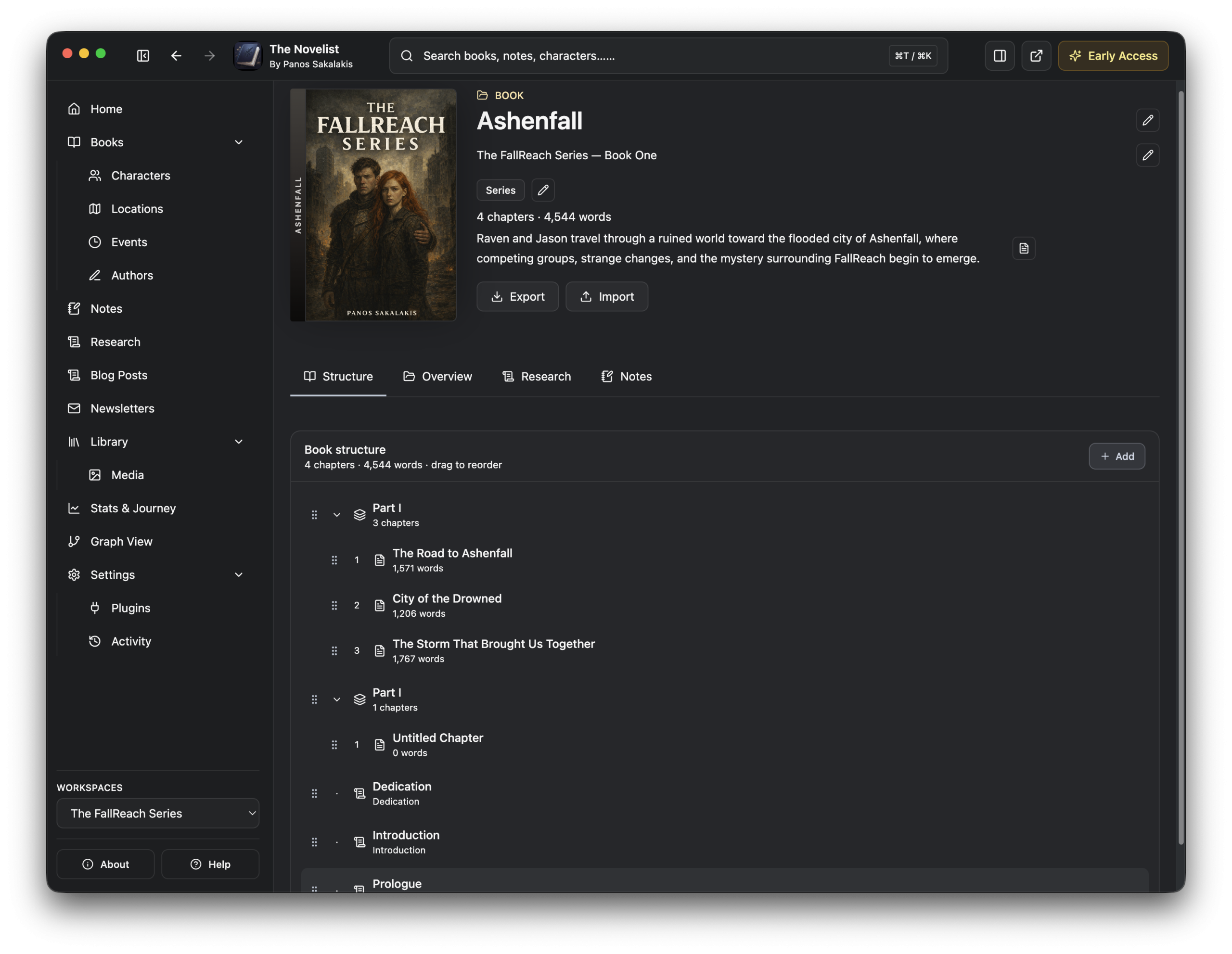
Here’s where things become a little more personal. As I mentioned at the beginning, I’m the developer behind The Novelist, and I want to explain why I started building it rather than simply presenting it as another application on this list.
For years, I’ve enjoyed experimenting with different writing tools. Some had wonderful editors, others offered excellent note-taking capabilities, and a few were particularly good at organizing complicated information. But I kept running into the same problem: I wanted a dedicated environment where writing a novel and developing its fictional world felt like parts of the same process.
I didn’t want a generic text editor with a couple of additional panels, and I didn’t particularly want a complicated knowledge-management application that required hours of configuration before it resembled a writing workspace. What I wanted was something that understood the basic building blocks of fiction.
A book contains chapters and scenes. Those scenes involve characters, take place in locations, and belong to a larger sequence of events. Characters have appearances, goals, fears, weaknesses, relationships, and histories. Locations have descriptions and connections to other places. Research material helps explain how the fictional world functions, while notes capture ideas that may eventually become important.
These aren’t unrelated pieces of information. They’re different parts of the same story. That’s the philosophy behind The Novelist.
A dedicated place for writing and worldbuilding
One of the things I wanted to address was how easily the writing process becomes fragmented. Imagine working on a post-apocalyptic novel. You’re writing a chapter involving three characters who enter an abandoned city, and suddenly you need to remember something important about the environment.
What would a city realistically look like after twenty-five years without maintenance? Would its skyscrapers still be standing? What happens to underground drainage systems? Could old elevators become dangerous? Would bridges begin collapsing? Those are the kinds of questions I research for my own fiction projects, including my FallReach Series.
In a traditional workflow, I might keep the manuscript in one application, my research in another, character descriptions somewhere else, and location information in a collection of documents. I wanted The Novelist to bring those pieces together.
The application includes a dedicated manuscript-writing environment, along with organizational sections for story-related information such as characters, locations, events, research, and notes. It also supports relationships between story elements, making it possible to organize a fictional universe in ways that extend beyond a traditional folder hierarchy.
For me, that distinction is important. A character shouldn’t exist only as a piece of text buried somewhere in a notebook. They should be part of the fictional world you’re constructing.
A writing environment that doesn’t compete with the manuscript
Another thing I’ve learned while developing The Novelist is that an application can offer plenty of useful features and still become exhausting to use if those features are constantly demanding attention. When I’m writing a chapter, I want the manuscript to remain the most important thing on the screen. I don’t want a dozen controls surrounding every paragraph, or an interface that makes me feel as though I’m managing a database rather than telling a story.
That’s why I’ve been working toward an editor that keeps writing central while making supporting information available when needed. Of course, designing a good writing interface is easier said than done, and I’m still refining many aspects of the experience. I’ve also included optional writing-related features such as progress tracking and milestones, because I know how motivating it can be to see evidence that a project is moving forward, especially when you’re dealing with a manuscript that might take months or years to complete.
These features aren’t intended to turn writing into a video game. They’re simply additional ways to acknowledge progress.
Local desktop software matters to me
The Novelist is also a desktop application, and that was a deliberate decision. I like being able to open my writing projects without relying on a browser or an active internet connection. I also care about preserving my work locally and maintaining sensible backup and recovery options.
Cloud-first applications have obvious advantages, especially when collaboration and automatic cross-device syncing are priorities. But for my own writing, I wanted a local-first experience. That doesn’t mean writers should ignore backups. Quite the opposite. I’ve spent a considerable amount of development time thinking about workspace safety, recovery, and the importance of protecting existing manuscripts when applications are updated. Nothing would be more frustrating than losing years of creative work because a writing application handled its data incorrectly.
Where The Novelist still falls short
I don’t want to pretend that my application is more mature than products that have been around for years. The Novelist is still in Early Access, and that means users should expect ongoing improvements, occasional bugs, and features that aren’t finished yet.
Scrivener remains more established and offers a remarkably mature manuscript-management system. Atticus and Reedsy Studio are stronger choices if your immediate priority is producing professionally formatted publishing files. Ulysses provides a polished Apple-focused syncing experience, while other cloud applications offer collaborative workflows that The Novelist isn’t attempting to duplicate. There are also parts of The Novelist’s interface and workflow that I’m continuing to improve based on feedback from early users.
I think it’s important to say that openly, because I wouldn’t want someone to move a completed manuscript into a developing application under the impression that every advanced feature found in Scrivener is already available.
Who should choose The Novelist? Fiction writers who want a desktop-first environment that combines manuscript writing with structured worldbuilding, character development, research, and story organization. If that sounds appealing, you can explore The Novelist and its Early Access editions. And if you decide to try it, I’d genuinely appreciate hearing what works, what doesn’t, and which features you believe would make the writing experience better.
The Novelist Review
Free ($39.99 for PRO per year)The Best Scrivener Alternatives Compared
After looking at these applications individually, I think it’s useful to compare them according to what they’re actually trying to accomplish.
| Application | Best for | Pricing model | Main limitation |
|---|---|---|---|
| Scrivener | Complex manuscripts and detailed organization. | One-time purchase | Learning curve and collaboration |
| Ulysses | Distraction-free writing on Apple devices. | Subscription | Apple-only and limited worldbuilding |
| Dabble | Accessible drafting and visual plotting. | Subscription | Publishing-format limitations |
| Atticus | Writing and formatting books. | One-time purchase | Less specialized worldbuilding |
| Reedsy Studio | Free writing, collaboration, and publishing. | Free with optional upgrades | Requires internet access |
| Obsidian | Interconnected notes and customizable worldbuilding. | Free with optional services | Requires setup for novel workflows |
| Novelcrafter | Complex fiction and optional AI tools. | Subscription | Cost and workflow complexity |
| LivingWriter | Cloud-based manuscript organization. | Free tier and subscriptions | Ongoing cost |
| Manuskript | Open-source novel planning. | Free | Less polished experience |
| The Novelist | Desktop writing and structured fictional worlds. | Free and Pro | Still in Early Access |
The important thing to remember is that these applications aren’t necessarily competing to solve exactly the same problems. Atticus is attractive because of its publishing capabilities. Obsidian offers extraordinary flexibility for organizing knowledge. Scrivener remains an incredibly powerful manuscript manager, and Reedsy Studio makes professional book formatting accessible to authors who might otherwise struggle to afford it.
Choosing between them should depend on the kind of work you’re doing, not on which application has the longest list of features.
What I’d recommend for different types of writers
If you’re writing your first novel and don’t have much money to spend, I’d start with Reedsy Studio. It’s accessible, capable, and offers enough functionality to help you go from an initial manuscript to a formatted book without immediately purchasing expensive software. Manuskript is also worth considering if you specifically want a free desktop application.
If you already know Scrivener and enjoy how it organizes complicated manuscripts, I wouldn’t switch just for the sake of switching. Learning an entirely new application can consume time that would be better spent writing, especially if your current workflow is already comfortable.
If you’re primarily interested in beautiful, distraction-free writing on Apple devices, I’d choose Ulysses. Its simplicity is part of its appeal, and there’s no reason to surround yourself with extensive worldbuilding tools if you don’t actually need them.
For authors who are planning to self-publish and want to simplify manuscript formatting, Atticus is an attractive option. Its value becomes particularly obvious when you’re preparing multiple books and would otherwise need additional formatting software.
For complicated fantasy and science-fiction projects, things become more interesting. Obsidian is exceptionally flexible, Novelcrafter offers more specialized story-management and AI-related capabilities, and The Novelist is being designed around keeping fictional information organized alongside the manuscript.
Ultimately, the best application is the one that makes writing easier instead of becoming another thing you have to manage. And there’s another consideration that I think deserves much more attention than it usually receives.
Your writing software shouldn’t hold your manuscript hostage
If there’s one piece of advice I’d give anyone choosing a writing application in 2026, it would be to think seriously about what happens if you eventually decide to leave.
- What happens to your manuscript if you stop paying for a subscription?
- Can you export your chapters into a commonly supported format?
- What about character profiles, research material, outlines, and other information you’ve accumulated over several years?
- Can you still access your writing without an internet connection?
- Are there automatic backups?
- Can you move your project to another computer without depending on a particular cloud service?
These aren’t exciting questions, and software companies rarely place them at the top of their marketing pages. But they’re critically important when you’re using an application to store something as personal and valuable as a novel.
A writing project isn’t like a disposable shopping list. It might contain years of work, thousands of hours of research, and ideas you’ve been developing since childhood. That’s why I would strongly encourage writers to maintain independent backups and periodically export their manuscripts into widely supported formats, regardless of the application they’re using.
Even if you’re completely satisfied with your writing software today, there’s no guarantee your preferences or the software itself will remain unchanged five years from now. The freedom to leave an application without losing your creative work is something I believe every author should have.
One more thing: Stop searching for the perfect writing app
I realize the irony of writing an article about Scrivener alternatives and then telling you to stop looking for writing software, but there’s something I think many writers need to hear. Sometimes, searching for the perfect application becomes another form of procrastination. I’ve certainly experienced that temptation.
There’s something satisfying about creating an elaborate writing workspace, choosing the perfect font, organizing character profiles, assigning colors to different categories, and designing a system that looks as though it belongs in a professional author’s studio. You can spend an entire afternoon making your writing environment look wonderful without writing a single meaningful paragraph. And because software is constantly evolving, there’s always another application to try, another feature to investigate, and another workflow that promises to make the writing process easier.
But no application, regardless of its price or capabilities, can do the most important part for you.
It can’t replace the difficult decisions you have to make about your characters. It can’t tell you which emotional moments deserve more attention. It can’t automatically turn a weak story into a memorable one simply because its interface happens to be beautifully designed. The tools matter, of course. Having your research organized and your manuscript easy to navigate can make an enormous difference, especially with complicated projects. But those tools should support the creative process rather than become its center.
My suggestion would be to select two or three applications from this list, import a small project or create a few chapters, and use each one for an actual writing session. Don’t just explore the settings. Don’t spend all your time admiring the interface. Try writing two thousand words, looking up character information, reorganizing a scene, and exporting a sample manuscript. You’ll learn more about whether an application works for you during those practical exercises than you will from watching ten promotional videos.
Final thoughts: Which Scrivener alternative would I choose in 2026?
If you’ve reached this point expecting me to declare one application the undisputed winner, I’m afraid the answer is a little more complicated. I still think Scrivener is excellent software. Its reputation is well deserved, and authors who have invested time into understanding its more advanced capabilities may have very little reason to abandon it. But I also think the writing-software market has become much more interesting than it used to be.
Reedsy Studio proves that authors don’t necessarily need expensive software to write and publish professional-looking books. Ulysses demonstrates how enjoyable writing can become when the interface is carefully designed around focus. Obsidian provides an entirely different way of thinking about fictional information, while Novelcrafter explores what happens when structured story management meets optional AI assistance.
And then there’s The Novelist, which represents my own attempt to create the writing environment I’ve wanted for years. I’m not going to claim that my application is the best choice for everyone, especially while it’s still in Early Access. There are established alternatives with features, integrations, and publishing tools that I haven’t implemented, and I’m comfortable admitting that. But I do believe there’s room for a writing application that treats characters, locations, research, relationships, and manuscripts as connected parts of a fictional world, rather than unrelated documents stored in separate folders. That’s what I’m trying to build.
For now, my recommendation is simple: choose the tool that feels comfortable, keeps your work safe, and lets you spend the majority of your time doing what you opened it for in the first place. Writing. Because at the end of the day, readers don’t particularly care whether your novel was written in Scrivener, Ulysses, Obsidian, Microsoft Word, or an application nobody has ever heard of. They care about the story. And so should we.


