By using this site, you agree to the Privacy Policy and Terms of Use.
Accept
TechWise Insider Logo TechWise Insider Logo Light
  • Home
  • Topics
    • Tech & AI
      • AI
      • Tech Reviews
      • Tech Guides
    • Content Creation
      • Blogging
      • WordPress
      • Podcasting
    • Online Business
      • Make Money Online
      • Freelancing
      • Monetization
    • Marketing & Growth
      • Marketing & SEO
      • Promoting a Business
      • Freebies
    • More Topics:
      • Opinions
      • Net Nuggets
  • Start Here!
    • How To Create a WordPress Website
    • How To Start a Blog
    • How To Start A Podcast
    • Affiliate Marketing: Beginner’s Guide
    • 16 Top Affiliate Programs and Platforms
    • How Rank Math SEO reshaped website optimization
    • The Ultimate SEO Checklist
  • Tools & Resources
  • ShopNEW
Info
  • About
  • Contact
  • Media & Press
  • Tools & Resources
  • Sitemap
Legal
  • Privacy Policy
  • Terms & Conditions
  • Comments Policy
  • Affiliate Links Disclaimer
Navigating Tech, One Byte at a Time!
Font ResizerAa
TechWise InsiderTechWise Insider
  • Home
  • Latest
  • Shop
  • Explore
    • Home
    • Blog
    • Sitemap
    • Tools & Resources
    • Shop
  • Topics
    • AI
    • Reviews
    • Guides
    • Net Nuggets
    • Personal Opinions
    • WordPress
    • Blogging
    • Make Money Online
    • Monetization
    • Marketing & SEO
    • Podcasting
  • Info
    • Contact
    • About
    • Terms & Conditions
    • Privacy Policy
    • Comments Policy
    • Affiliate Links Disclaimer

✨ Find and Download Cool Free Resources

Interesting for some freebies? Look no more:
  • Free Obsidian Vaults
  • Free Canva Templates
  • Free Website Templatesg
More coming soon...
Go To Shop
Freebies

I’ve created an Obsidian Vault for book and novel-writing

It's free to download and use for your next book or novel.

Panos Sakalakis
By
Panos Sakalakis
ByPanos Sakalakis
Panos Sakalakis is a web developer, podcaster, SEO expert, and writer with over 17 years of experience. At the ripe old age of 30 years old,...
Follow:
Last updated: 07/11/2025 at 3:42 PM
Share
The Novelist - Main Character (Light Mode)
The Novelist - Main Character (Dark Mode)
The Novelist - All Chapters and Mindmap (Light Mode)
The Novelist - All Chapters and Mindmap (Dark Mode)
The Novelist - Novel-Writing, Notes, and Mentions (Light Mode)
The Novelist - Novel-Writing, Notes, and Mentions (Dark Mode)
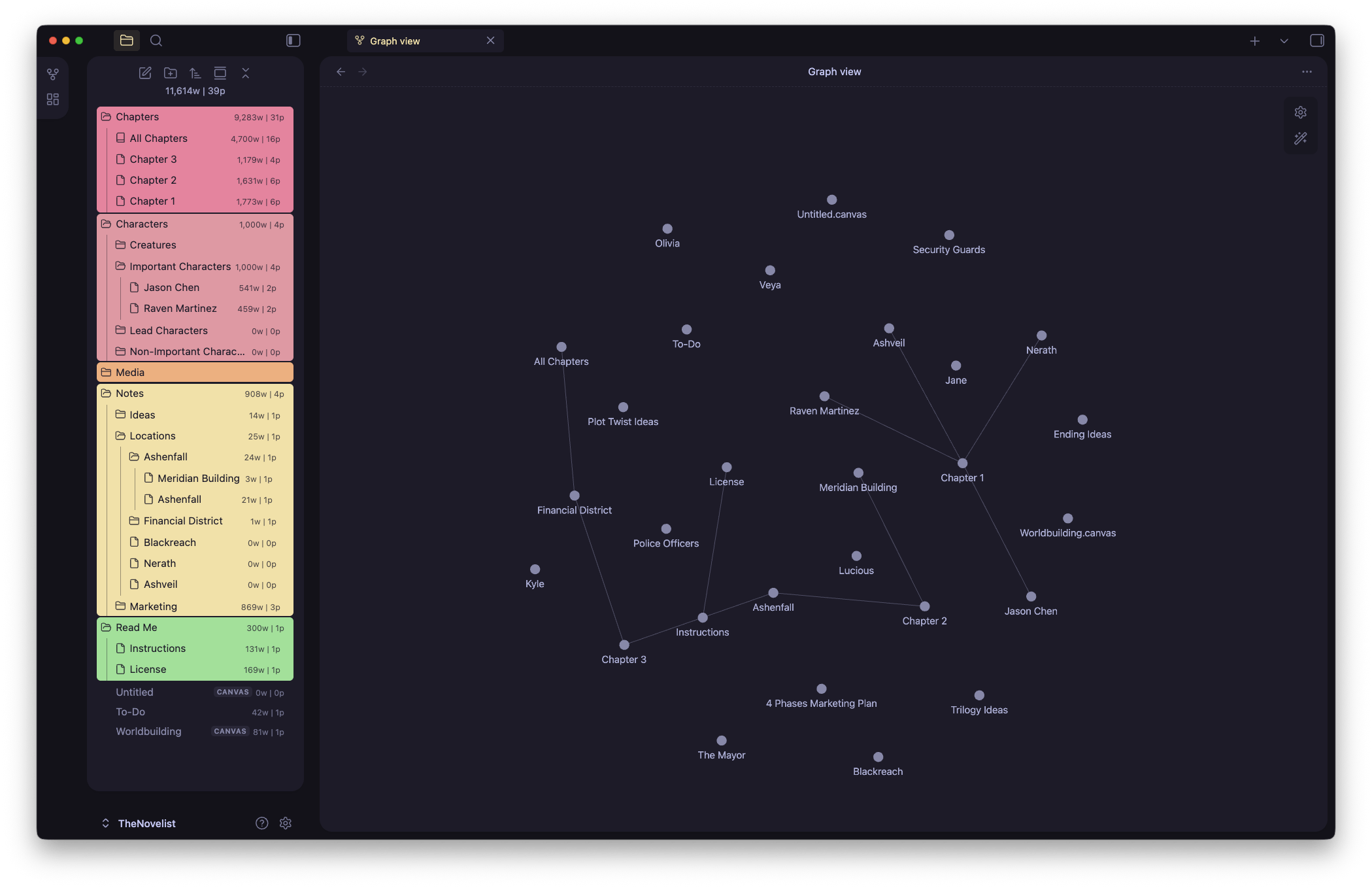
The Novelist - Obsidian Mindmap (Light Mode)
The Novelist - Obsidian Mindmap
The Novelist - Split Tabs All Chapters (Light Mode)
The Novelist - Split Tabs All Chapters (Dark Mode)
The Novelist - World-Building for Novels (Light Mode)
The Novelist - World-Building for Novels (Dark Mode)
The Novelist - Main Characters in Split Tabs (Light Mode)
The Novelist - Dark Mode
The Novelist - To-Do in Kuban Boards (Light Mode)
List of Images 1/15
The Novelist - Main Character (Light Mode)
The Novelist - Main Character (Dark Mode)
The Novelist - All Chapters and Mindmap (Light Mode)
The Novelist - All Chapters and Mindmap (Dark Mode)
The Novelist - Novel-Writing, Notes, and Mentions (Light Mode)
The Novelist - Novel-Writing, Notes, and Mentions (Dark Mode)
The Novelist - Obsidian Mindmap (Light Mode)
The Novelist - Obsidian Mindmap
The Novelist - Split Tabs All Chapters (Light Mode)
The Novelist - Split Tabs All Chapters (Dark Mode)
The Novelist - World-Building for Novels (Light Mode)
The Novelist - World-Building for Novels (Dark Mode)
The Novelist - Main Characters in Split Tabs (Light Mode)
The Novelist - Dark Mode
The Novelist - To-Do in Kuban Boards (Light Mode)
Disclosure: This website may contain affiliate links, which means I may earn a commission if you click on the link and make a purchase. I only recommend products or services that I personally use and believe will add value to my readers. Your support is appreciated!

I’ve used Obsidian to write my first sci-fi novel. It took me a whole one and a half years to finally finish all the chapters, and in that time, I learned how to use the app better than ever, especially when it comes to novel-writing.

Contents
  • The Novelist – A free Obsidian Vault designed for novel-writing
  • Theme and community plugins
  • Versions and feature updates
    • Changelog

Although Obsidian is one of the best apps out there for note-taking, project planning, journaling, novel-writing, and thousands of other things, setting it up can take a lot of time. For me, it was all about constantly experimenting with different themes and plugins, and I had to recreate some of my Vaults from the ground up.

Finally, I found the perfect setup based on my personal taste and preferences, and you can download it completely for free and start your next novel quicker than ever before.

The Novelist – A free Obsidian Vault designed for novel-writing

Say hello to The Novelist, an Obsidian Vault designed for writers and novelists alike, available to download completely for free.
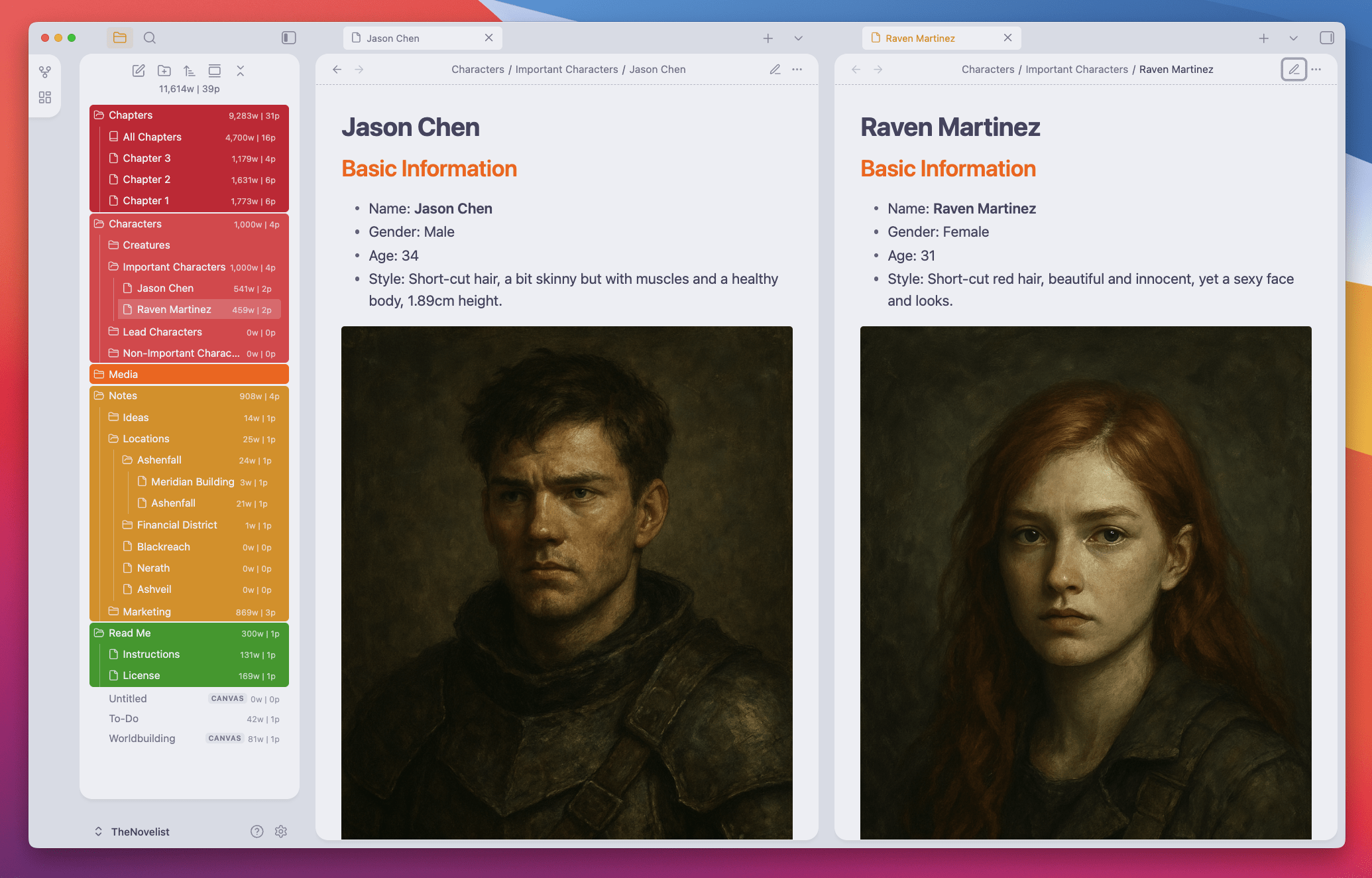
The Novelist - Main Characters in Split Tabs (Light Mode)
The Novelist – Main Characters in Split Tabs (Light Mode)

I’ve been using this template for a few months now, and it has worked like a charm for each of my books and novels. It’s simple, minimal, easy to use, and it can be customized with tons of different things, including disabling or enabling features and options. I kept things clean and disabled a lot of internal plugins, but you can enable them with 1 click.

The Novelist - Main Character (Dark Mode)

The Novelist – Free Obsidian Vault

Start writing your next book/novel within minutes. Just download and extract the file, move the folder to a preferred location, launch Obsidian, and add the folder as a new vault.

Ideal for Novelists
FREEGet It Now

Theme and community plugins

The Novelist uses the AnuPpuccin theme with a few small adjustments made by me (but you can quickly restore everything to the theme’s default settings).
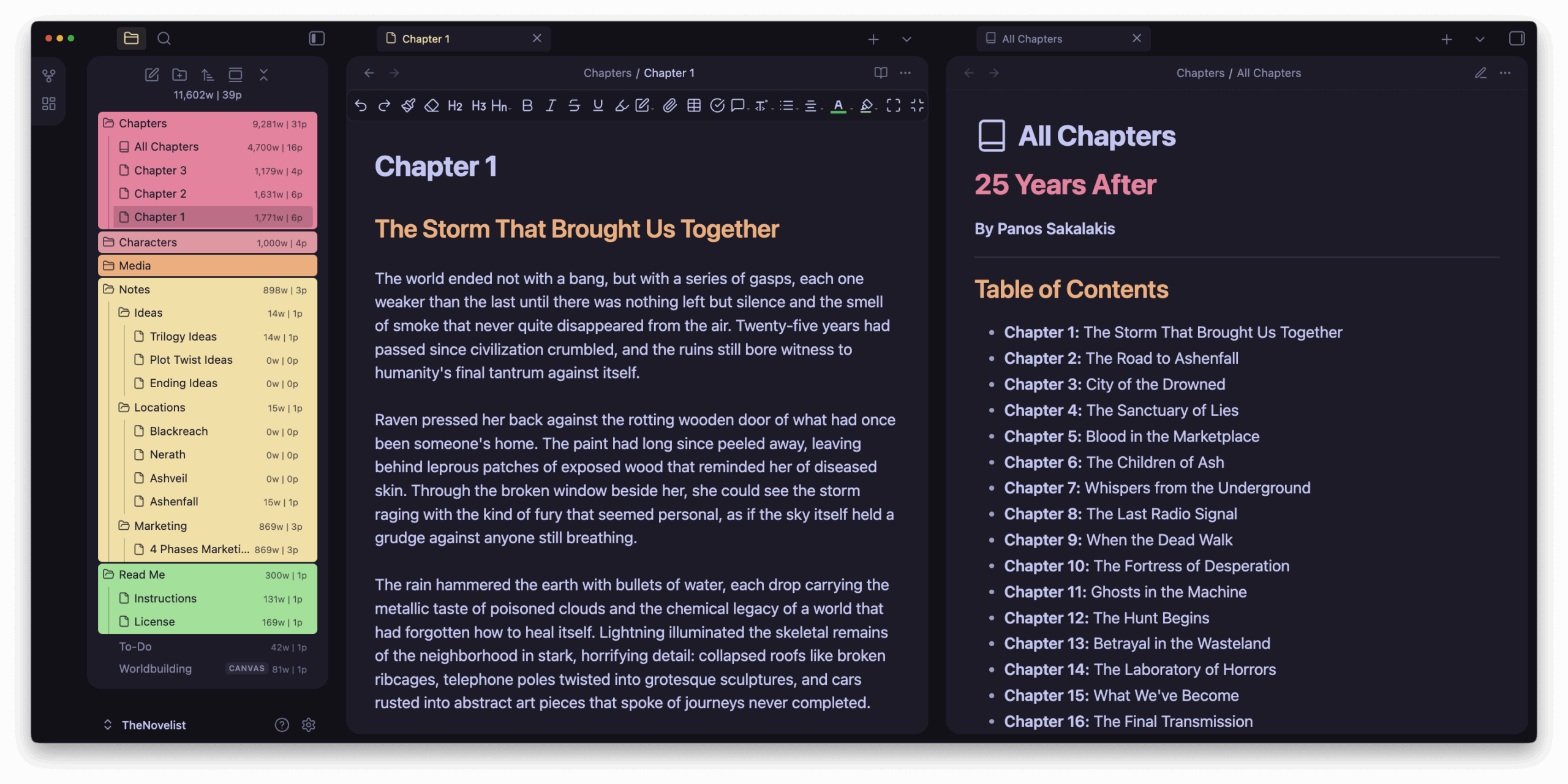
The Novelist - Split Tabs All Chapters (Dark Mode)
The Novelist – Split Tabs All Chapters (Dark Mode)

Although the base structure of the vault will stay intact, some of its features won’t work without the following plugins.

PluginDescription
Editing Toolbar:I’m one of those writers who hate the markdown format, so I need a proper editing toolbar to quickly make changes and format my text.
Excalidraw:This is the ultimate plugin that I use to create Canvas, which is what you see in the “Worldbuilding” canvas file that’s included in the Vault. It’s a great way to start connecting your story and seeing it come alive as you progress.
Iconic:Not a good reason here, I just love icons.
Novel Word Count:It displays the number of words and pages just beside the title of each folder or file.
Style Settings:This is the plugin that’s letting you adjust the theme’s colors, typography, etc.

When it comes to the internal plugins, I only kept active the following ones:

  • Canvas
  • Daily Notes
  • File Recovery
  • Files
  • Graph View
  • Note Composer
  • Page Preview
  • Search
  • Tags View
  • Templates
  • Word Count
The Novelist - Obsidian Mindmap
The Novelist – Obsidian Mindmap

You can install even more plugins if you want to, or disable the ones that you won’t be using. If you want to sync your vault with Microsoft OneDrive or Google Drive, there are great free plugins for that.

How to sync Obsidian for free using Terabox in 2025

Versions and feature updates

Based on user feedback, new plugins getting released, or even building some custom functionalities in the near future, I’ll be updating The Novelist every now and then.

I’ll also try to always keep it compatible with the latest versions of Obsidian, as I am also using it on a daily basis for my novels and books.

Changelog

Version 1:

  • Initial release.

You’ll always have the option to download the earlier versions of The Novelist, starting from the first one to the most recent one.

TAGGED:Obsidian
Share This Article
Facebook Flipboard LinkedIn Threads Bluesky Copy Link
ByPanos Sakalakis
Follow:
Panos Sakalakis is a web developer, podcaster, SEO expert, and writer with over 17 years of experience. At the ripe old age of 30 years old, he's writing his first sci-fi novel, learning more about artificial intelligence and how to train his own AI models, and he only eats strawberry ice cream.
Leave a Comment Leave a Comment

Leave a Reply Cancel reply

Your email address will not be published. Required fields are marked *


Last Published

Best Ways to Start an Online Store
Make Money Online

Best e-Commerce Platforms & Marketplaces to sell online (2026)

Apple Music - Artist Page - Linkin Park
App Reviews

I’ve tried Apple Music for 3 months (but it didn’t work out)

Ghost Blog and Newsletter Platform
Blogging

How to start a Ghost blog or newsletter in 5 minutes

Here's how to use One-Key-HiDPI (a free tool) to quickly and easily fix macOS's HiDPI resolution problem
Tech Guides

How to add any custom HiDPI resolution on macOS

Categories

Affiliate Programs and Platforms to make money
Make Money Online
9 Articles
SEO - Low-Difficulty Vs High-Difficulty Keywords
Marketing & SEO
12 Articles
WordPress plugins to increase your performance
WordPress
26 Articles
Proven Ways to Make Money Online from Home
Monetization
4 Articles
How To Start a Blog - A Beginner's Guide
Tech Guides
29 Articles
Mozilla Firefox Review - Is the web browser worth it
Tech Reviews
4 Articles

Must Read

How to fix the AdSense's issue on your IAB TC string
MonetizationBlogging

How to fix the AdSense’s issue on your IAB TC string

The Best To-Do And Note-Taking Apps
App Reviews

The 18 Best To-Do And Note-Taking Apps in 2026

Affiliate Programs and Platforms to make money
MonetizationMake Money Online

16 Top Affiliate Programs and Platforms to make money (2025)

How I use Vivaldi Browser to organize my workflow
App Reviews

Vivaldi Browser Review: Should you make the change in 2025?

Recent Comments

  • Mikaela Mcguire on How to add any custom HiDPI resolution on macOS
  • Paola Quinn on 29 Proven Ways to Make Money Online from Home
  • Jaylin Carpenter on How to add any custom HiDPI resolution on macOS
  • Kelton James on 29 Proven Ways to Make Money Online from Home
  • Mason Franecki on Todoist Review: An affordable Task-management & To-Do app

Get Free Resources

Sign up for the monthly newsletter and get free digital products and resources.
nl-right

Explore More Topics

  • Tech Guides
  • WordPress
  • Blogging
  • App Reviews
  • Search Engine Optimization (SEO)
  • Mobile Apps
  • Linux
  • Personal Opinions
  • Marketing & SEO
  • Software
  • Website Reviews
  • WordPress Plugins
  • Windows 11
  • Make Money Online
  • AI
TechWise Insider Logo TechWise Insider Logo Light

Unveiling tomorrow’s tech, today! TechWise Insider is your guide to the latest tech reviews, how-tos, personal opinions, and everything tech-related. From new AI innovations to the best ways to create content, stay organized, and start your own online business

Facebook Twitter Youtube Rss

© 2025 – All Rights Reserved.

Designed with ❤️ & lots of ☕ by Panos Sakalakis.

Welcome Back!

Sign in to your account

Username or Email Address
Password

Lost your password?

Not a member? Sign Up