


Although the world is now filled with note-taking and to-do apps, many of them now with AI-powered features that promise to do the hard work for you, there are only two that keep standing as the ultimate choices: Todoist and TickTick.
Yes, the world is filled with to-do and note-taking apps, many that [nowadays] carry robust new AI-powered integrated features. But I am a productivity app hopper, which is not far from the distro-hopping that I talked about a few months ago, so here’s my shot and honest confession: Give me more to-do and note-taking apps. I want them all!
I have “shiny object syndrome” for to-do lists. If a new app promises to organize my life, I will download it, set up color-coded folders, and convince myself that this is the one that will finally make me an organized adult.
A few days ago, I updated my massive guide on “The 18 Best To-Do and Note-Taking Apps in 2026“. Writing that list reminded me that for most of us, the battle really comes down to two heavyweights: Todoist and TickTick.
I really wanted to see why so many people have chosen those two, and to do so, I have spent the last six months strictly using Todoist and TickTick. I didn’t just dabble; I moved my entire life into them. If you are stuck choosing between the two, you can now stop reading Reddit threads (like I did).
If you’re impatient (sounds like me), here’s the short version:
- Choose Todoist if: You want speed. You want to type “Buy milk every Tuesday” and have it instantly set up. You want a clean, beautiful app that just handles tasks and gets out of your way.
- Choose TickTick if: You want everything in one place. You want your calendar, your habits, and a focus timer all inside your to-do list. You are okay with a slightly messier interface in exchange for power.
I wish this article were as easy as putting a list with two options and calling it a day. But it’s not, and I learned a lot of things using those two solutions for day-to-day tasks, personal and client notes, grocery and wishlist lists, etc.
Round 1: Ease your brain
The most important job of a to-do app is to let you dump your brain quickly so you don’t forget things.
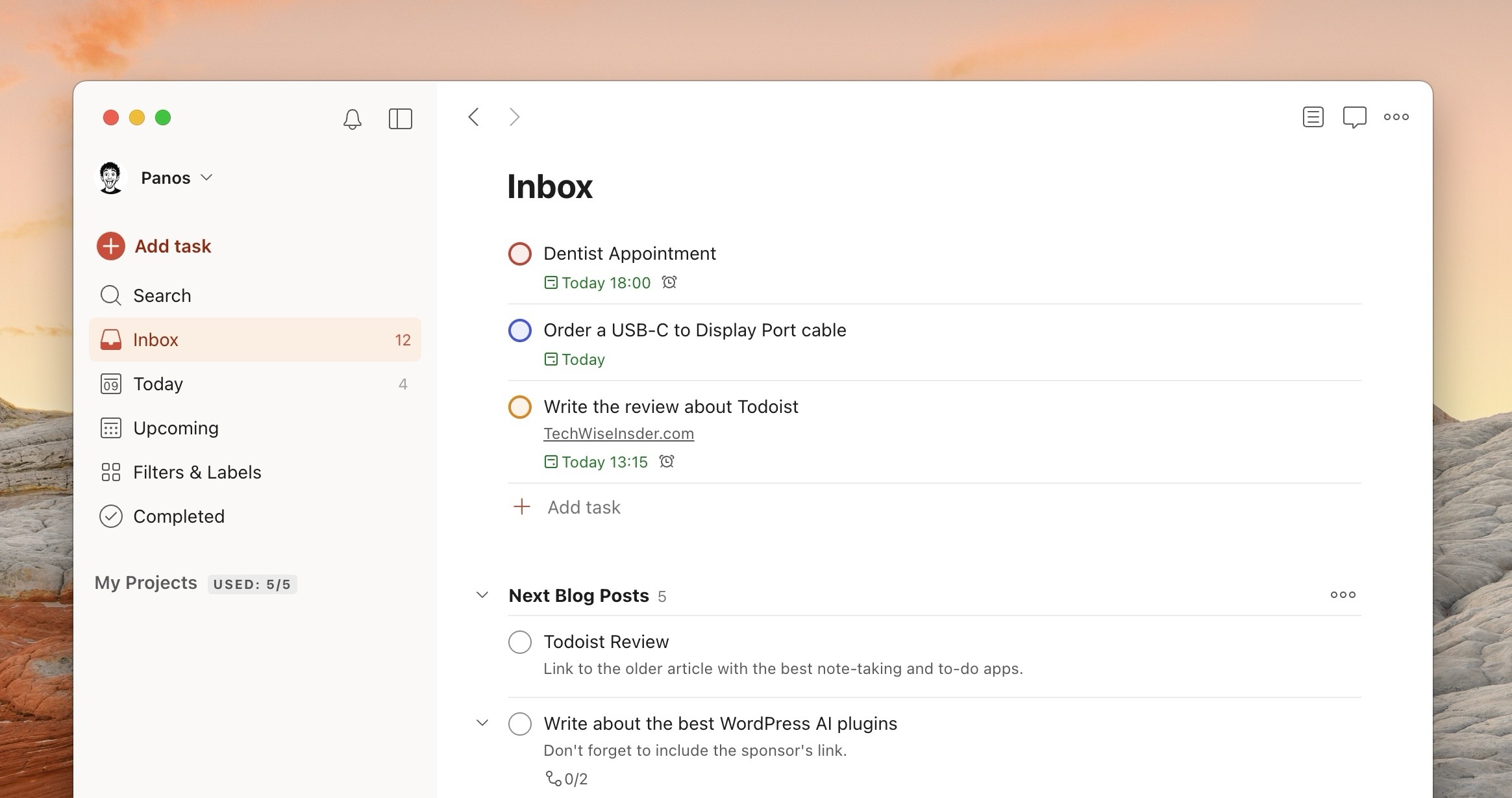
Todoist is the king here. It has a feature called “Natural Language Processing.” That sounds fancy, but it just means you can type like a human. If I type: “Submit report every last Friday at 4 pm #Work,” Todoist instantly knows the date, the time, the recurring schedule, and the project. I don’t have to click any menus. It feels like magic.
TickTick tries to do this, but it is clunky. It often gets confused. If I type the same sentence, sometimes it puts the time in the wrong spot or misses the recurring part. I often have to stop typing and manually click the calendar icon to fix the date. That extra friction annoyed me every single day.
Winner: Todoist. It is simply faster and better.

Round 2: Planning your days
This is where things get interesting.
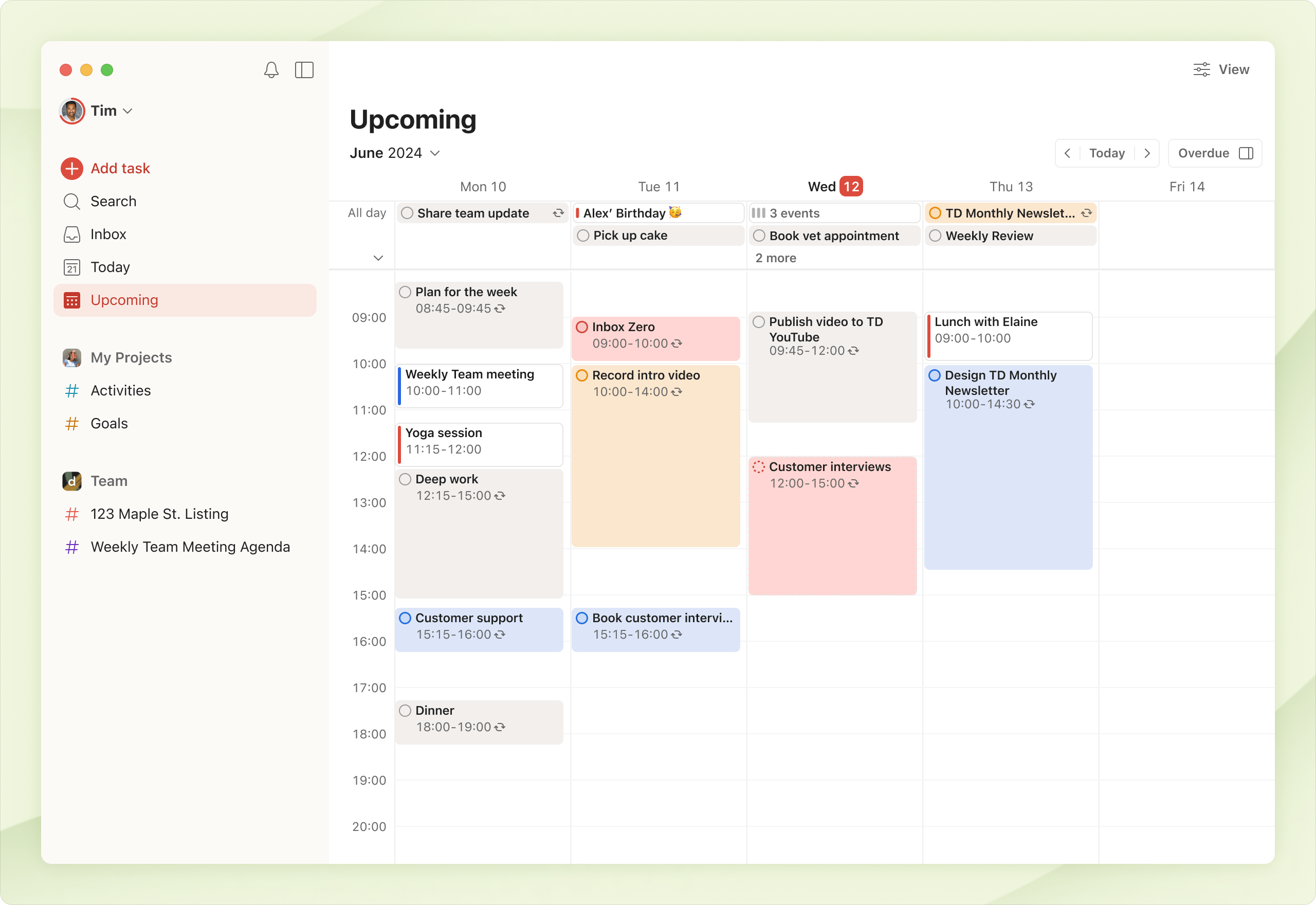
TickTick destroys Todoist here. TickTick isn’t just a list; it is a full calendar. You can see your tasks and your Google Calendar events on the same screen. You can drag a task from your list and drop it onto 2 PM on your calendar to “time block” your day. It is incredible for visual planners.
Todoist recently added a calendar view, but it is weak. It only shows tasks, not your actual calendar events (unless you set up a complicated 2-way sync that often breaks). You cannot easily drag tasks around to plan your day hour by hour, unlike in TickTick.
Winner: TickTick. If you like to see your day as a schedule, this is the only choice.
Round 3: The extra goodies
TickTick is like a Swiss Army Knife. It has:
- A Habit Tracker: Want to track “Drink water” or “Read 10 pages”? It’s built-in.
- A Pomodoro Timer: Need a focus timer? It’s built-in.
- Eisenhower Matrix: This is a fancy way of sorting tasks into four boxes: “Urgent & Important,” “Urgent & Not Important,” etc. TickTick does this automatically.
- White Noise: It plays rain sounds while you work. Built-in.
- Calendar: Google Calendar synchronization.
- Bonus: The ability to add voice notes, display widgets on your desktop, and connect with lots of popular third-party apps are just a few of the extra features that TickTick has built in.
Todoist is a knife. Just a really, really sharp knife. It does tasks. That’s it. If you want a timer or a habit tracker, you have to download separate apps and connect them.
- Karma: This is a gamification system. You get “Karma points” for completing tasks. It sounds silly, but I admit I worked harder just to reach “Grandmaster” level.
- AI Assistant: Todoist uses AI to help you break down tasks. If you have a task like “Plan Wedding,” you can click a button and the AI will split it into 20 smaller, manageable steps.
Winner: TickTick. You get more for your money.
Round 4: The Look and Feel
This is subjective, but Todoist is beautiful. It has a lot of “white space” (empty room) that makes it feel calm. When you have 50 things to do, a calm interface stops you from panicking. The mobile app is slick, fast, and feels modern.
Todoist handles chaos beautifully. It uses a system of Projects, Sections, and Labels. It handles sub-tasks (tasks inside tasks) very neatly, and although this is subjective, it has a lot of “white space” (empty room) that makes it feel calm. When you have 50 things to do, a calm interface stops you from panicking. The mobile app is slick, fast, and feels modern.
TickTick, on the other hand, can get messy. Because it has so many buttons (Habits, Calendar, Timer, Search, Lists), the interface is crowded. The settings menu also features more options than Todoist, but overall, it’s not like that you’re using something too complex; it’s just more robust than the alternative, that’s it.
But here’s the catch: Although Todoist looks more stunning (personal opinion, of course), its Calendar looks very clean and beautiful, and as a free user, you can choose another color for TickTick’s interface. Premium users have the ability to choose one of the premium themes or even build their own custom theme.
Winner: Todoist. It’s a joy to look at.
Round 5: The Price
Both apps include a free but limited version that you can use. Todoist, for example, restricts you to 5 personal projects, 5MB file uploading, 3 custom filters, and basic collaboration with other users.
- Todoist Pro: ~€5.00 to €8.00 per month (€60.00 to €96.00/year).
- TickTick Premium: ~$3.99 per month ($35.99/year).
TickTick is cheaper and gives you more features. Todoist charges more for “less,” but you are paying for the polish and the speed. Also, the latter comes with two subscription plans, one for individuals and one for businesses with teams.
Winner: TickTick. It’s cheaper and provides more features.
 Todoist
 Tick Tick
Final Round: And the Winner Is…
That was, arguably, one of the hardest decisions that I had to make between two apps that basically do the same things. For me, Todoist is perfect for quickly adding new notes and making sure you won’t forget anything. It performs really fast, it’s stable, and overall, it has a nice and minimal UI that I just prefer.
But… and there’s always a ‘but’, when it came to using Todoist for my clients and the important tasks that I had to finish, this is where things got a bit more complex. Don’t get me wrong, it’s a great app to use as a freelancer, but I felt that I was getting more things with TickTick, and each time I launched the app, I went straight to its ‘Countdown’ section.
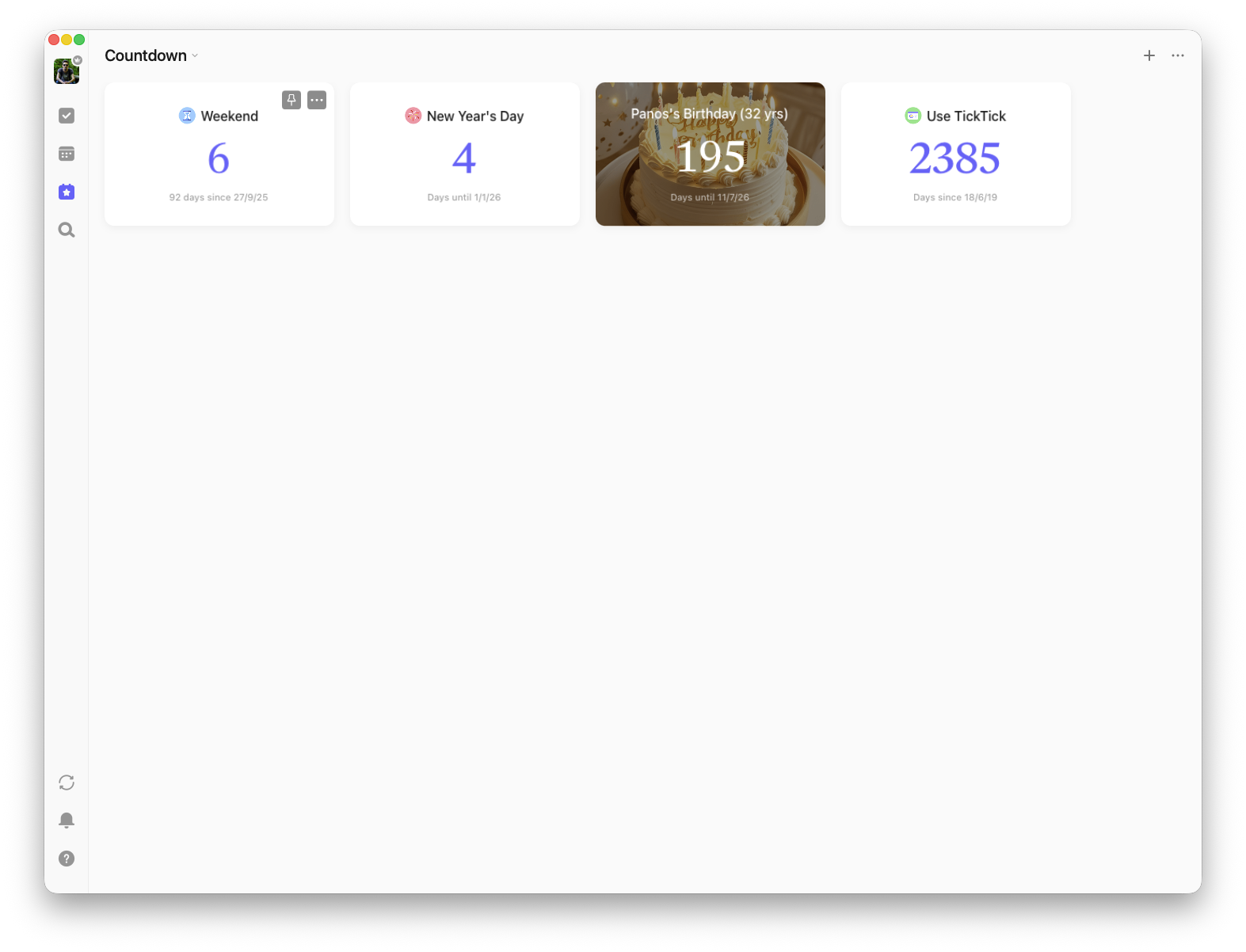
Speaking of the ‘Countdown’ section, which I still haven’t mentioned for a good reason, TickTick has this beautiful page where you can go and create your own custom timers. What are those? Well, you can see how many days until this weekend is over, how many days till New Year’s Eve, and how many days have passed since you joined the app. You can also create your own custom countdowns, and displaying my best friend’s birthday to make sure I’ll never forget them again is pretty cool, to say the least.
While TickTick has a lot of features and options, it’s not exactly as robust and feature-rich as Notion, where I was spending more time tweaking things rather than doing any actual work, but it takes a bit more time to get used to and set up your workflow (unlike Todoist).
After months of testing, I settled on Todoist. Why? Because friction is the enemy.
TickTick has more features, but I found myself tweaking my calendar and playing with the habit tracker instead of actually doing the work. It was too powerful (compared to Todoist).
Todoist is limited, and that is its strength. The “Natural Language” input is so good that I actually use it. I can capture a task in 3 seconds on my phone and get back to my life. I use a separate app for my calendar (Google Calendar) and a separate app for habits. I prefer having three amazing specialized apps over one app that does everything “okay.”
My advice? Download Todoist first. Use the free version. If you find yourself wishing you could see your tasks on a calendar or track your habits in the same window, then switch to TickTick. But if you just want to stop forgetting things? Todoist is the one.
Editor’s Note
Unfortunately, I was unable to take and share my own screenshots. Sure, Todoist was empty, but TickTick? That still had hundreds of notes and tasks, both for my personal projects and for clients, so tweaking it to hide the names was too much work.


Appreciate the this review but I notice you didn’t really touch on reliability on backups and organization in that sense. Wondering what your intake on that is. My worry is my backups, and my documentation are always gonna be there and how you feel in terms of reliability in that aspect. tickTick doesn’t back up your comments on a local backup, which is concerning and wondering if you had any insight on any of that
Greetings from the best unisex salon! This comparison between Todoist and TickTick is very informative and practical for anyone searching for the right productivity and task management app. The real-user experience, feature comparisons, and usability insights make the article easy to relate to and helpful for choosing the best app based on personal workflow and organization needs. Really engaging and well-explained content.