The browser wars are back, but this time, it’s not about speed or tabs; it’s about thinking. If 2025 was the year AI browsers exploded onto the scene, 2026 is the year they finally got good. I’ve spent the last few months testing every major AI browser to see which ones are actually useful and which are just Chrome with a chatbot glued to the side.
The two types of AI Browsers
With such a massive and aggressive shift to AI-based tools, every company has rushed to push their own models (or third-party customized) to their software, platforms, etc. Among them, web browser companies.
Now, while some companies have already implemented some kind of AI-powered assistant, others have announced their new AI browsers. And while it may feel like they’re all the same, which is true to some level, they’re quite different.
So, in today’s comparison and reviewing, I’ll categorize them in two sections:
- True AI Browsers: By “true,” I mean those that have an AI assistant that can actually interact with your browser’s tabs, open and close websites, navigate, click, and basically do everything that a human can.
- Just Chrome with chatbots glued to it: Those are the browsers that they’ve just added a chat window to the left or right side of their interface and are only able to reply and assist you like they would if you were using them from a website (like ChatGPT).
I wanted to test both sections, because while we’ll be seeing a lot more AI-based browsers coming up within the next few years (we’re waiting for you, Google), some will just implement AI assistants and nothing more, and that’s completely fine. Mozilla’s new CEO has also announced that the company will be focusing on AI, so let’s we what the future holds.
There are also web browser companies that announced they’ll be staying out of the AI war, and they won’t introduce any AI-powered tools or assistants for the time being. One of them is, of course, the king of all customization and flexibility; Vivaldi.


The best AI Browsers that can actually interact with tabs
The following AI browsers can do more than just reply to you; they can actually click, navigate, open and close tabs, and even buy for you this week’s groceries, and maybe a new phone charger because your current one pushes the electricity in your bones.
Now, just because they can interact with your browser doesn’t mean they’re actually good at it or that they’ll do it quickly enough. Most tasks will be completed faster by you than the AI assistant, which gets really frustrating when it’s thinking indefinitely (you’ll see what I mean in a bit).

Comet Browser
Built by Perplexity AI (released July 2025), this browser treats the web less like a library and more like an interview. Instead of giving you ten links to open, the Comet Assistant reads them for you.
My favorite feature is the “Agent” capability. I can tell Comet, “Find the best mechanical keyboard under $150 with brown switches and summarize the top 3 reviews,” and it literally goes out, “reads” the pages, and comes back with a table. It also has a seamless voice mode on mobile that makes me feel like I’m talking to a surprisingly well-read friend.
The “Cross-Tab Summary” is also a lifesaver; it connects dots between five different open tabs without me having to copy-paste context.
But overall, it was really slow, and most of the time, it was constantly making mistakes. In the end of the day, it takes fewer seconds to do a task yourself than letting Comet, except if you’re leaving your PC and you want it to do it for you (if it does it right).

ChatGPT Atlas
Atlas feels like the heavy guy of the group. It isn’t just a browser; it’s an operating system for ChatGPT. The standout feature here is Browser Memory. Atlas remembers everything (if you let it). I can open it today and say, “Continue that research on Athens hotels we started last Tuesday,” and it instantly re-opens the relevant tabs and recalls our conversation context.
It also features Agent Mode, which is terrifyingly good at multi-step workflows. I once asked it to “Plan a 3-day itinerary for Kavala based on these 4 travel blogs and export it to a table,” and it did it in 30 seconds.

Dia
There is no sidebar. There are no widgets. There is just the web, and a “Conversational URL Bar.” You type your intent into the address bar, like “Open the last three docs I worked on and summarize the changes,” and it just… happens.
It uses a “Skills” framework that lets you build custom workflows. I built a “Morning Brief” skill that, with one command, opens my newsletter, my calendar, and summarizes the top tech news. It feels less like a tool and more like an extension of your brain. It anticipates what you want to do, which is nice and different from the other alternatives.
Best AI Browsers with AI Chatbots/Assistants implemented
The following “AI Browsers” are not exactly “AI”. They just implemented their own LLMs, or are giving you the option to choose and easily switch between many third-party AI models (e.g, ChatGPT, DeepSeek, Grok, Claude, etc.)
While the AI browsers that we’ve seen earlier could interact with your browsers, the following can’t, but they have other benefits that may suit you.

DuckDuckGo
DuckDuckGo comes with the cleanest interface and most minimalistic design. The soft shadows in the tabs just make every tab look clean, and it’s easier for my eyes to recognize the right tab. From the home page, you can choose to search with the classic DuckDuckGo search engine, which is powered by the DuckDuckBot and Bing’s results, or use Duck.ai, which takes you to the AI chatbot with a similar interface to ChatGPT.
There are only a few things that keep me from switching to the DuckDuckGo browser, including not being available for Linux (the most important one), and missing crucial workflow features like group tabs and splitting tabs. Other than that, it’s a great browser with a privacy-focused AI assistant to help you further without selling your data a few minutes later.

Brave Browser
The genius here is the Isolated AI Profile. When you ask the Brave AI (“Leo”) to do something agentic, like summarizing a page or checking prices, it spins up a completely separate, sandboxed profile. This means the AI cannot see your banking cookies or your logged-in email unless you explicitly allow it.
Leo also supports “Skills,” allowing me to connect it to local PDFs and Google Docs. It’s not as “magical” or proactive as Comet or Atlas, but it feels significantly safer. The browser itself feels fast, but don’t expect anything too “AI”.

Opera One
I’m not really sure how Opera lost its touch on design, but the tabs look absolutely awful and so outdated, I can’t even stand looking at them. Then you get Opera, Opera Air, Opera GX, Opera Neon, Opera One… the f..k? Opera AI looks really stunning though, it’s like the new kid in town that you know all girls’ll fall in love with.
I’m not even sure which browser I reviewed. Maybe it was Opera One, maybe it was the classic Opera browser, who knows. Don’t get my word, just try it yourself and see if it fits you. The only thing I know is that I downloaded a file from a page that writes “Opera One,” but when it’s installed, it just says “Opera.” Go figure.
Note: It seems that I was actually using Opera One, and the version: 125.0.5729.49 to be more exact (you can see that by going to Opera -> About Opera).

Microsoft Edge
Microsoft Edge is based on the Chromium project, and unlike some other alternatives, it has had its time to evolve and improve. It’s now the default browser on Windows, and provides a fast and stable experience that few do. Edge also comes with support for Edge and Chrome extensions, offers tab grouping, tab splitting, and Workspaces for better organization and workflow, and it’s available on all major operating systems, including Linux (who would have thought, huh?)
What I really liked about Edge, apart from CoPilot, which is handy, fast, and based on the latest versions of GPT, is also the interface, which, although is quite bloated, you can actually adjust it to look a whole lot simpler than it does right now. Last but not least, CoPilot can’t interact with your browser as well as Atlas or Dia, but with Microsoft’s aggressive implementation of artificial intelligence, I don’t think it’s going to take too long.
More to come in the near future!
The war between which company can build the best and smartest web browser has only just started, and it already looks different from what we’re used to all these years. Maybe those AI-based browsers don’t really need all those fancy workflow features and built-in tools that we’ve been using; maybe the need for automation will completely change the way we work.
For the past few months, using those AI browsers has been a really, really interesting journey, especially when it comes to my workflow. I mean, I can just tell Dia to open all the tabs I need for a specific workflow, or search for a specific product and open all the reviews it can find about it while I’m making my first cup of coffee.
“Hey Dia, I’m just starting my day. Open 5 of the most popular tech news websites to read the latest news.” If it does it without giving me an error, it’s such a convenient way of starting your workflow. I mean, it’s like having a person to make your morning coffee and breakfast just as you’re getting out of bed.
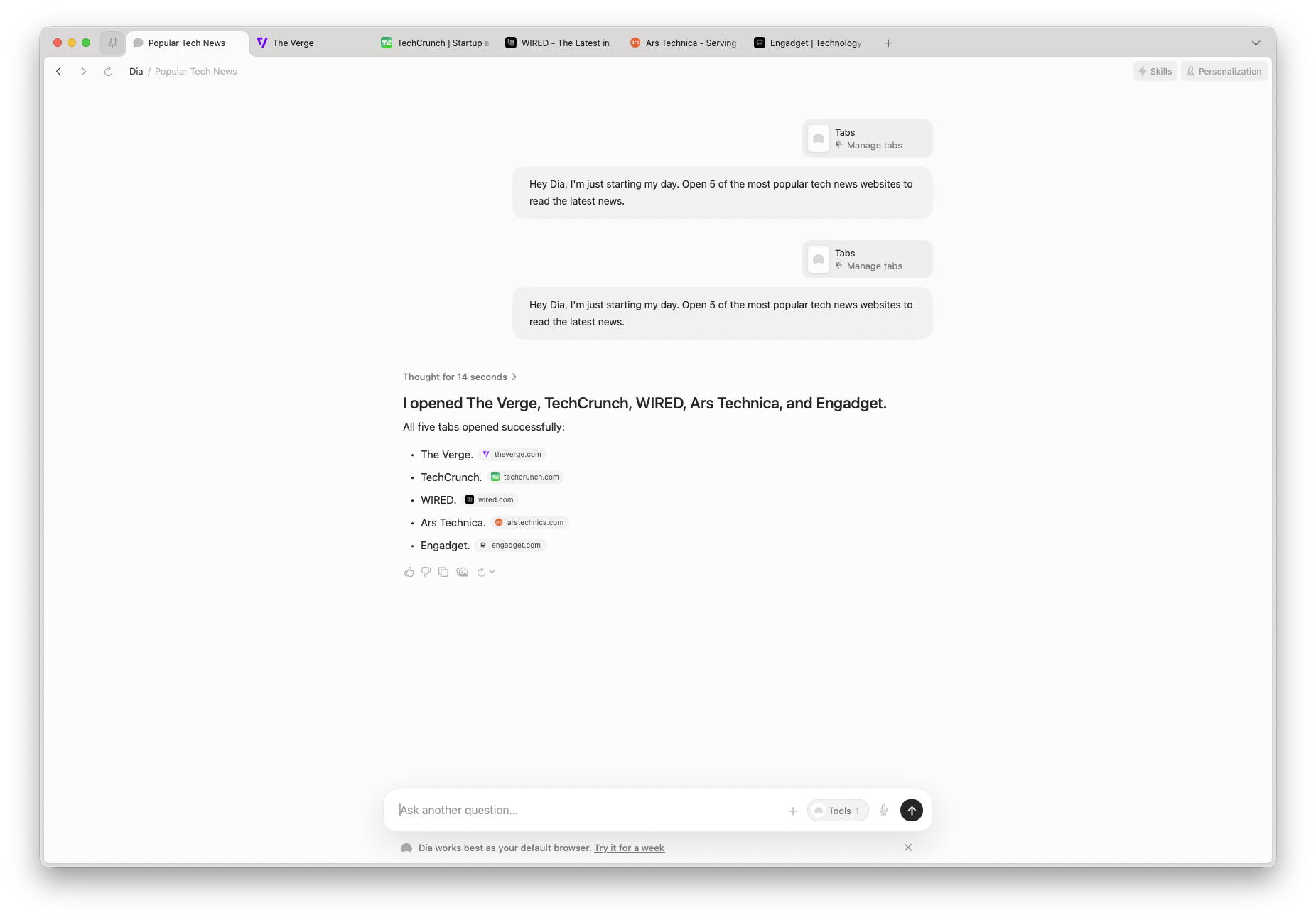
Unfortunately, as they’re still in their early versions, they’re very basic. For example, there’s no way to keep all your prompts or workflows somewhere saved, so I keep them in my note-taking app, and I’m copy-pasting them each time to make my life easier.
We’re also waiting for Google to announce its new AI browser, which, reportedly, won’t be Chrome, but a new version of it. This is exciting because I’m using the Pro version of Google’s Gemini, and it’s pretty powerful. And as Mozilla’s new CEO is getting ready to implement more AI into Firefox, we may see the good old wars between those two rivals.
Have you used an AI browser? And if so, how was your experience, and what are your thoughts on artificial intelligence being integrated within our browsers? And what did you and hate the most about them?
If you haven’t, what’s keeping you from trying them? Let me know in the comments down below.